




Passwordless EHR Access for Shared Workstations: How It Works and Why Passwords Fail

Key Takeaways
- Shared clinical workstations break the one-user-per-device assumption behind traditional EHR security, producing open sessions, shared credentials, and audit logs that point to machines instead of people.
- Passwordless EHR access ties every session to a verified individual through badge, biometric, or passkey factors, restoring attribution without slowing the floor down.
- Standard MFA and SSO fail on shared endpoints because they assume personal phones, per-user OS profiles, and once-a-day logins.
- No single method wins everywhere: badge tap wins on speed, face on hygiene and hands-free use, passkeys on phishing resistance; most deployments combine them.
- Passwordless directly supports HIPAA unique user identification, automatic logoff, and audit control requirements, and handles EPCS re-authentication as an in-session step-up.
- Start with one high-volume unit, enroll staff at shift start, keep your existing IdP, define fallbacks, and measure login time and session attribution to build the case for scale.
Pull the access logs from any busy clinical unit and a pattern shows up fast. The same generic login stays active for sixteen hours, dozens of people chart under it, and the audit trail points to a workstation instead of a person. That pattern is now one of the most persistent EHR security gaps in healthcare. According to The HIPAA Journal's 2025 Healthcare Data Breach Report, 2025 set a new record with 772 large healthcare data breaches reported to OCR, exposing the protected health information of more than 139 million individuals.
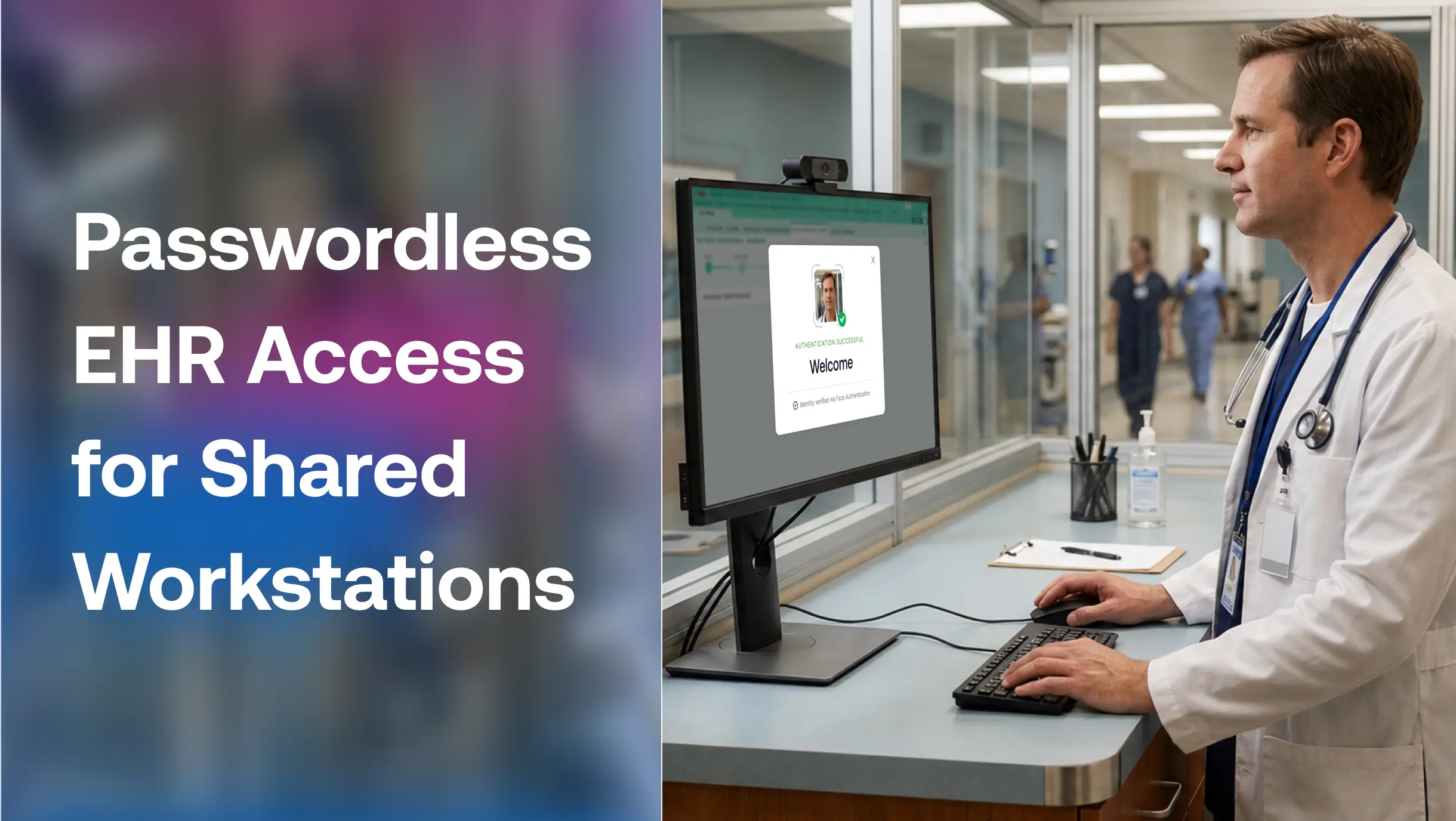
Passwordless EHR access replaces typed credentials with authentication factors people carry or are, such as a badge tap, a face scan, a fingerprint, or a FIDO2 passkey. Each factor ties a session on a shared workstation to a verified individual instead of a shared secret anyone can borrow. For hospitals, clinics, and long-term care facilities where frontline staff move between terminals all shift, this shift changes both electronic health records security and the speed of care.
This blog post explains why shared workstations defeat traditional logins, how passwordless methods compare on shared endpoints, and how to roll out stronger EHR security without disrupting clinical work.
Why Shared Workstations Break Traditional EHR Login
Most EHR security models assume one person per device. Shared clinical workstations violate that assumption every hour. A single terminal at a nursing station, med room, or registration desk serves dozens of users per shift, and each handoff creates a decision point: Log out properly and force the next person through a full credential entry, or leave the session open and keep the line moving.
Staff choose speed, because patient care demands it. The predictable EHR security failures follow. Sessions stay open between users, credentials get shared verbally or on sticky notes. Aggressive timeout policies meant to close the gap instead lock people out mid-task, which pushes them toward more workarounds, not fewer.
None of this reflects negligence. It reflects an access model designed for office desktops colliding with shift-based, multi-user reality. Until the model changes, EHR security policy and clinical workflow keep pulling in opposite directions.
What Passwordless EHR Access Means
Passwordless EHR access authenticates users into electronic health record systems like Epic, Cerner (Oracle Health), without a typed password, using possession factors (a proximity badge, a security key, a registered device) or inherence factors (face, fingerprint, palm). Unlike passwords, authentication relies on asymmetric cryptography rather than a reusable shared secret.
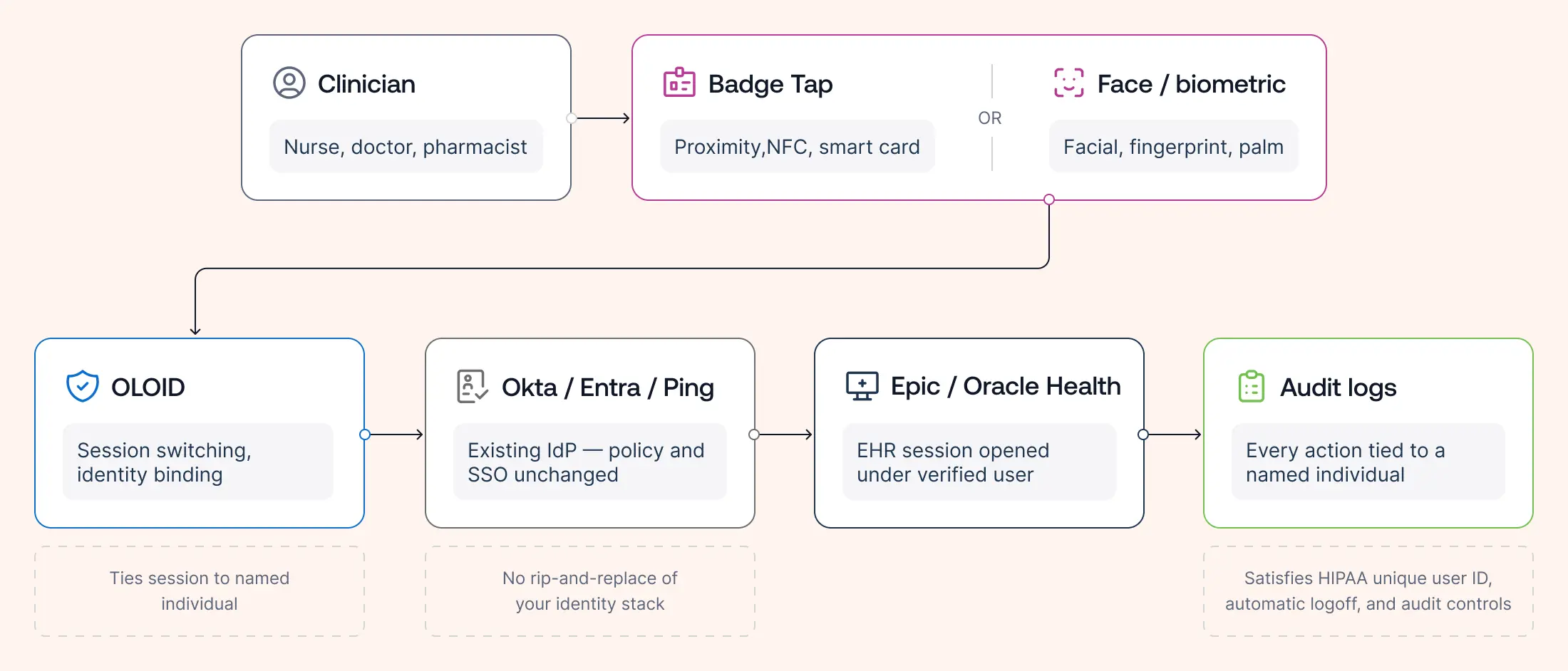
On a shared workstation, the mechanics matter more than the terminology. The device itself stays generic. Identity attaches to the session, not the machine. A clinician taps a badge or glances at a camera, the EHR opens under their profile, and when the next person authenticates, the session switches to them. Every order, note, and record view is logged under a named individual, forming the foundation that the rest of EHR security builds on.
When an organization investigates inappropriate record access, medication errors, or insider threats, the audit trail becomes the primary source of evidence. If multiple clinicians use the same authenticated session, investigators can determine which workstation was used—but not which individual acted. Passwordless authentication restores individual accountability without slowing clinical workflows.
Why MFA and SSO Don't Solve the Shared Device Problem
Standard MFA and SSO improve EHR security on personal devices, and most health systems already run them. Shared workstations expose three assumptions baked into both.
First, push-based MFA assumes every user carries an enrolled personal phone. Many frontline workers leave phones in lockers, work in units where personal devices stay outside, or never enroll a personal device for work at all.
Second, SSO assumes a per-user operating system profile. Kiosk-mode workstations run one generic Windows session precisely so they boot fast and stay available. SSO into the EHR helps once a user is identified, but it cannot identify who walked up to a generic session.
Third, both assume the login event happens once per day. On shared endpoints, authentication happens dozens of times per user per shift. A 30-second MFA ceremony that feels trivial at a desk becomes an hour of cumulative friction on the floor, and friction is what breeds the shared logins that hollow out EHR security audit trails.
Passwordless methods designed for shared devices close all three gaps: No personal phone required, identity resolved at the session layer above the generic OS profile, and authentication fast enough to repeat all day.
How Passwordless EHR Access Works on a Shared Workstation
Passwordless Methods Compared for Shared Workstations
No single factor wins everywhere. Evaluate each against the criteria that decide EHR security outcomes at a shared terminal: user switching speed, tolerance for gloves and PPE, hygiene, phishing resistance, and what happens when the credential goes missing.
Badge Tap Access
Tap-in, tap-out with the ID badge staff already wear. Switching takes about a second, it works with gloves, and enrollment is trivial. The weakness is that a badge proves possession, not identity; a lost or borrowed badge authenticates whoever holds it. Pairing the tap with a short PIN or a periodic biometric check restores individual assurance while keeping the speed.
Facial Recognition
A camera identifies the user as they approach, making it the fastest fully hands-free option and the most hygienic, with nothing to touch and nothing to carry. It works through most PPE configurations, though masks plus face shields can degrade accuracy. Modern systems store mathematical templates rather than face images, which matters for both privacy and biometric regulations like BIPA.
Fingerprint
Mature, cheap, and accurate, fingerprint readers suit registration desks and pharmacy stations. They struggle exactly where frontline healthcare lives: gloved hands, frequent handwashing that wears prints, and shared-surface hygiene concerns in clinical areas.
FIDO2 Passkeys and Security Keys
Hardware-bound passkeys deliver the strongest phishing resistance of any method and satisfy the highest NIST authenticator assurance levels, which makes them a fit for privileged users, IT staff, and step-up scenarios.Unlike passwords, passkeys use public-key cryptography. The private credential remains securely stored on the user's authenticator and never leaves the device, while authentication is completed using cryptographic key pairs instead of reusable secrets. As a result, passkeys cannot be stolen through phishing sites or replayed after a database breach. On high-turnover shared workstations, they add a physical object to manage per user, so most organizations deploy them selectively rather than floor-wide.
Most successful deployments combine methods: Badge plus PIN or badge plus face for routine access, with passkeys or biometric step-up reserved for sensitive actions.
No single method wins across every clinical setting. Evaluate each based on what your environment actually demands.
| Method | Speed | Gloves | Hygiene | Phishing Resistant | Best For |
|---|---|---|---|---|---|
| Badge tap | Excellent | Excellent | Excellent | Moderate | Shared workstations |
| Face | Excellent | Excellent | Excellent | High | Clinical units |
| Fingerprint | Good | Poor | Poor | High | Admin areas |
| Passkeys | Good | Excellent | Excellent | Excellent | IT / Admin |
What Passwordless Delivers: Speed, Attribution, and Compliance
The EHR security business case rests on three measurable outcomes.
Speed: Cutting each authentication from 20 to 30 seconds down to one or two seconds, multiplied across dozens of logins per user per shift, returns real clinical minutes every day. Faster logins also remove the incentive to share sessions, which quietly fixes the behavior no policy memo ever fixed.
Attribution: When every session belongs to a verified individual, audit logs regain their meaning. Investigations into inappropriate record access, drug diversion monitoring, and routine access reviews all depend on knowing who did what. Shared logins make those logs fiction; passwordless EHR access makes them evidence.
Compliance: The HIPAA Security Rule requires unique user identification, automatic logoff, and audit controls for systems holding ePHI. Passwordless authentication on shared workstations satisfies all three EHR security safeguards more cleanly than password policy ever did, and it handles the hard case too: EPCS re-authentication for controlled substance orders can run as a fast biometric or token step-up inside the session, meeting DEA two-factor requirements without breaking workflow.
How to Implement Passwordless EHR Access on Shared Workstations
Treat the rollout as a workflow project with an EHR security payoff, not the reverse.
Start narrow: Pick one unit and one workflow, typically the shared workstations with the highest login volume. Success there produces the internal champions and hard numbers that carry the broader rollout.
Plan enrollment for shift reality: Frontline staff cannot attend midday enrollment sessions. Run enrollment at shift start, during onboarding, or at the badge office, and keep it under two minutes per person.
Keep your identity stack: Passwordless access for shared endpoints layers onto the identity provider you already run, whether Okta, Ping, or Entra. Platforms built for frontline environments, such as OLOID, sit between the shared device and the existing IdP, adding badge, face, and passkey authentication with per-user session switching while directory, policy, and SSO stay where they are.
Define fallbacks before day one: Lost badges, failed biometric reads, and visiting staff all need a documented path that does not reintroduce shared passwords.
Measure: Track seconds per login, logins per shift, help desk password tickets, and the share of EHR sessions attributed to named individuals. Organizations like OLOID's manufacturing and healthcare customers typically frame success in exactly those operational terms, because that is the language that wins budget for phase two.
Shared workstations are permanent fixtures of frontline healthcare. The generic logins running on them do not have to be.
Healthcare organizations don't struggle with passwords because clinicians ignore the security policy. They struggle because shared workstations require authentication models built for shared environments rather than personal devices. Passwordless authentication aligns security with clinical workflow, giving every user fast access while restoring the individual accountability that healthcare compliance depends on.
FAQs
1. What is passwordless EHR access?
Passwordless EHR access authenticates users into electronic health record systems using a badge tap, biometric scan, or passkey instead of a typed password. On shared workstations, it ties each session to a verified individual rather than a shared login.
2. Is passwordless authentication HIPAA compliant?
Yes. The HIPAA Security Rule is technology-neutral and requires unique user identification, automatic logoff, and audit controls. Passwordless methods meet these requirements more reliably than passwords, which are routinely shared on clinical floors.
3. Which passwordless method works best on shared clinical workstations?
Badge tap paired with a PIN or periodic biometric check offers the best balance of speed, glove compatibility, and individual assurance for routine access. Facial recognition leads for hands-free, hygienic authentication, while FIDO2 passkeys suit privileged users and step-up actions.
4. Do biometric systems store images of faces or fingerprints?
No. Modern systems convert the scan into an encrypted mathematical template and match against that. Raw images are never stored, which supports compliance with biometric privacy laws such as BIPA.
5. What happens if a badge is lost or a biometric read fails?
A well-designed deployment includes fallback paths, such as a temporary credential issued after identity verification or an alternate enrolled factor. The fallback should never be a shared password, since that reintroduces the original problem.

Get the latest updates! Subscribe now!

