




What is OCR? A Guide for Identity-Driven Environments

Key Takeaways
- OCR converts scanned images and printed documents into machine-readable text, eliminating manual data entry and making static content searchable and actionable.
- The process runs through four core stages: image acquisition, preprocessing, text recognition using pattern or feature methods, and postprocessing with layout analysis.
- OCR types range from simple pattern matching to AI-driven intelligent character recognition, each suited to different document types and environments.
- In healthcare, manufacturing, and logistics, OCR accuracy directly affects operational outcomes. Errors in these environments carry real consequences beyond data cleanup.
- OCR functions as the data capture layer in identity workflows. The verification decision depends on what comes after: a separate authentication system that confirms whether the person presenting the credential is who the document says they are.
- In shared-device and shift-based environments, pairing OCR-based credential reads with passwordless authentication closes the auditability gap that shared passwords leave open.
Optical Character Recognition (OCR) is a technology that converts printed or handwritten text from scanned documents, images, PDFs, or ID cards into machine-readable digital text. Instead of manually typing information, OCR automatically extracts the text so software can search, edit, verify, or process it.
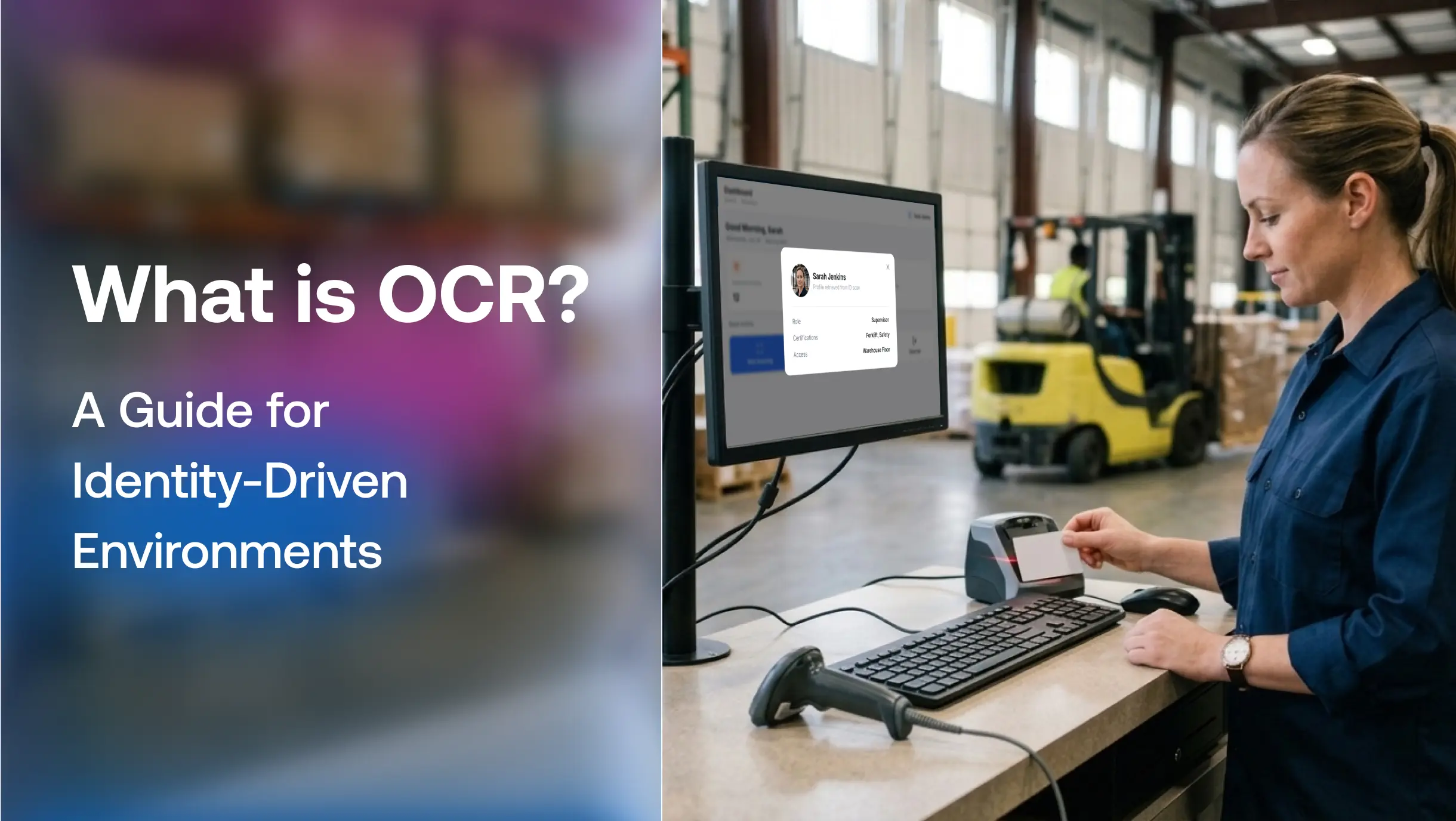
Think about what happens when a warehouse supervisor scans her employee ID at a shared terminal at the start of her shift. Within seconds, the system pulls up her role, certifications, and access clearances, all from a document scanned during onboarding. She does not type anything. She does not wait. She just gets to work. That is OCR doing its job quietly in the background.
The global OCR market stood at $17.06 billion in 2025 and is on track to reach $44.52 billion by 2031, growing at a 17.34% CAGR, with identity verification and KYC projected to be among the fastest-growing application segments. That growth signals something: the world is not just scanning more documents. It is using OCR to make faster, more consequential decisions about who gets access to what.
This blog explores how OCR works at a technical level, the four types you will encounter, where it creates real value in high-stakes environments, the accuracy risks that rarely get discussed, and how OCR connects to modern identity and access management.
What is OCR?
A scanned document is just an image, a photograph of text. A computer sees pixels, not words. OCR is the layer that reads those pixels and converts them into actual characters a machine can process, search, index, and act on.
That distinction matters. A scanned employee badge image sitting in a file server is inert. The same image processed through OCR becomes structured data: a name, an ID number, a department code that can connect to an access control system, an HR database, or an authentication workflow.
How OCR Works: The Core Steps
Image Acquisition and Preprocessing
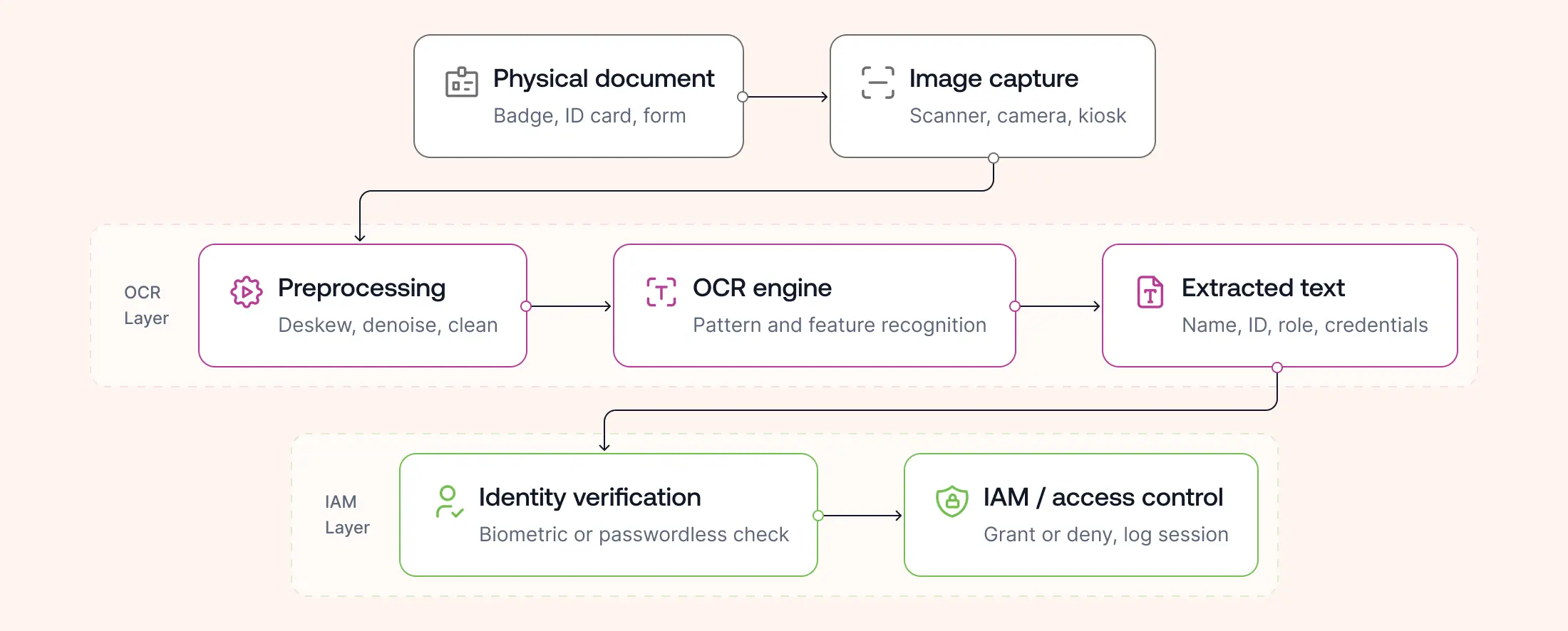
The process starts with capturing a document via scanner, camera, or mobile device. The OCR engine converts the raw input into a two-color bitmap: dark areas are text, light areas are background.
Before any character recognition begins, the image gets cleaned. Preprocessing corrects skew if the document was scanned at an angle, removes noise and stray pixels, identifies whether the document contains handwriting or print, and strips out graphical elements like boxes and ruled lines that could interfere with text recognition.
The quality of this step directly determines accuracy downstream. A poorly lit scan of a shipping label in a warehouse or a crumpled intake form at a clinic will produce worse output than a clean, flat document, a constraint that matters in operational environments.
Text Recognition: Pattern vs Feature Methods
Two algorithms handle the core recognition work.
Pattern matching compares each character in the scanned document against a library of stored glyph templates, matching by shape, scale, and font. It works well on typed documents in known fonts but struggles with anything outside its training set.
Feature recognition takes a different approach. It analyzes the structural properties of each character, its angles, loops, line intersections, and curves, and identifies it based on those attributes. It handles unfamiliar fonts and works better in real-world conditions where documents vary widely. Recognized characters get converted into ASCII code for downstream processing.
Layout Analysis and Postprocessing
A complete OCR engine does more than read characters. It analyzes the full document structure, dividing content into text blocks, tables, and images, then breaking those down into lines, words, and characters.
After recognition, the extracted content is stored as an editable file or a searchable PDF. Some systems retain both the original image and the processed output for audit and compliance purposes, a detail that matters in regulated industries where document provenance needs to be traceable.
Types of OCR Technology
Listed in order of sophistication:
Simple OCR matches characters against stored templates. Accurate for clean, typed documents in known fonts, but limited by the size of its glyph library.
Optical Mark Recognition (OMR) identifies non-text marks: checked boxes, survey bubbles, signatures, logos, and watermarks. Used heavily in forms processing and compliance checks.
Intelligent Character Recognition (ICR) brings machine learning into the pipeline. A neural network trains repeatedly on text, learning to identify curves, intersections, and loops the same way humans develop reading fluency. ICR handles handwriting and semi-structured documents that simple OCR cannot.
Intelligent Word Recognition takes ICR further, recognizing complete words as single units rather than assembling them character by character. Faster and more accurate for high-volume processing.
| Technology | Reads | Best Used For |
|---|---|---|
| OCR | Printed text | Documents, IDs |
| OMR | Check marks | Surveys, Forms |
| ICR | Handwriting | Paper Forms |
| Intelligent Word Recognition (IWR) | Entire words | High-volume document processing |
AI OCR and Intelligent Document Processing
Traditional OCR focuses on recognizing characters, but modern AI-powered OCR combines machine learning and computer vision to improve accuracy on low-quality scans, handwritten documents, multilingual text, and complex layouts. Often called Intelligent Document Processing (IDP), these systems can classify documents, extract key fields, and understand document context rather than simply converting images into text.
Where OCR Creates Real Value: High-Stakes Environments
OCR in Healthcare
In healthcare settings, OCR processes patient intake forms, scans insurance documents, extracts diagnosis codes from handwritten clinical notes, and feeds that data into electronic health records. The productivity case is well-documented. The less-discussed case: accuracy here is not optional. A misread dosage, a transposed patient ID, or a wrongly captured insurance code carries consequences that extend well beyond an IT ticket.
OCR in Manufacturing and Logistics
On the floor, OCR reads shipping labels, quality control tags, and compliance documentation at speed. Embedded in warehouse terminals and kiosk systems, it connects physical paperwork to digital supply chain workflows without manual re-entry. In manufacturing, OCR on shared workstations captures inspection records, batch data, and operator sign-offs, tying physical work to a digital audit trail.
OCR in Identity Verification and Access Control
This is where OCR moves from document tool to identity infrastructure. OCR extracts data from government-issued IDs, employee badges, certifications, and access credentials, converting printed identity claims into machine-readable inputs that downstream systems can verify.
In a multi-shift environment where dozens of workers share terminals, kiosks, or tablets, OCR reads a presented credential and passes that data to an access control or IAM system for verification. The OCR layer handles the read. The identity layer handles the verification question.
That handoff is where solutions like OLOID operate, designed specifically for frontline and shift-based environments where credential verification at shared devices needs to be fast, accurate, and tied to an individual rather than a shared login.
Popular OCR Platforms
Organizations commonly use OCR platforms such as ABBYY FineReader, Google Cloud Vision OCR, Microsoft Azure AI Vision, Amazon Textract, Adobe Acrobat OCR, and the open-source Tesseract OCR engine. While these tools excel at extracting text from documents, they stop at data capture. Identity verification still requires additional authentication technologies to confirm the person presenting the credential.
OCR Challenges
| Challenge | Impact |
|---|---|
| Poor lighting | Lower recognition accuracy |
| Wrinkled documents | Missing characters |
| Handwriting | Reduced confidence |
| Low-resolution cameras | False matches |
| Skewed scans | Incorrect extraction |
OCR Accuracy Risks in Operational Environments
The accuracy narrative around OCR tends to be optimistic: near-perfect conversions, 99% recognition rates, AI-driven precision. Those numbers hold under ideal conditions. They do not always hold in the environments where OCR matters most.
Factors that degrade OCR accuracy in operational settings include poor lighting common in warehouses and clinical environments, document wear and physical damage, non-standard or handwritten fonts, low-resolution capture devices, and inconsistent scan angles. Each of these is routine on a factory floor or in a busy intake room.
In identity verification workflows specifically, a misread character in a name or ID number can produce a false mismatch that blocks legitimate access or, more critically, a false match that grants access to the wrong person. At scale, in a shift-based environment with dozens of access events per hour, even a low error rate compounds quickly.
This is why OCR functions as the first step in an identity workflow, not the complete solution. It reads. A separate verification layer, whether biometric, token-based, or passwordless, confirms.
OCR and Passwordless Authentication
OCR digitizes the credential. Authentication verifies the person behind it.
That sequence is the foundation of modern access control in high-throughput environments. An employee presents a badge or ID. OCR extracts the relevant data. An IAM or authentication system cross-references that data against a verified identity record and either grants or denies access without requiring the employee to recall a password or manually enter anything.
In shared-device environments, this matters even more. Passwords on shared terminals are a known security liability. When ten workers use the same kiosk across a shift, a shared password means zero auditability: no reliable way to know who accessed what, or when. Replacing that with an OCR-enabled credential read paired with a passwordless verification layer solves both the usability and the security problem at once.
OLOID's approach to frontline identity is built around exactly this architecture: credential capture paired with fast, individual verification that works on shared devices without slowing down shift transitions.
Why Standard OCR Deployments Break Down for Frontline Workers
Most OCR implementations are designed with a single-user, office-based workflow in mind: one person, one device, one document at a time. That assumption does not survive contact with a manufacturing floor, a hospital ward, or a logistics hub.
In frontline environments, the conditions that OCR struggles with most are the conditions that exist by default. Shared terminals get handled by dozens of workers across a shift. Documents arrive crumpled, damp, or poorly lit. Capture devices are mounted at awkward angles or built into kiosks that were not designed with optimal scan quality in mind. Workers move fast and do not have time to reposition a document for a cleaner read.
The downstream consequences of OCR errors in these settings are not minor. A misread employee ID at a warehouse access point does not just create a help desk ticket. It either locks out a legitimate worker mid-shift, disrupting operations, or it passes the wrong data to the access system entirely. In healthcare, a poorly captured credential on a shared workstation used by clinical staff across multiple shifts creates gaps in the access audit trail that compliance teams later have to explain. The other problem is session accountability. In a shared-device environment, OCR alone cannot tell an access system which specific person is standing at the terminal right now. It reads what is presented. If the same badge gets passed between workers, or if a credential document is left at a workstation, OCR has no mechanism to flag that. That accountability gap is structural, and it does not close until a verification step sits behind the OCR read.
Frontline deployments need OCR that is tuned for real-world capture conditions, paired with a verification layer that ties each session to a confirmed individual, and fast enough that it does not create a line at the kiosk during shift change. That combination is what separates an OCR tool from an OCR-enabled identity workflow.
Conclusion
OCR has been around for decades, but its role is shifting. What started as a tool for digitizing paper is now the front edge of identity workflows in some of the most access-sensitive environments in operation today: hospitals, warehouses, manufacturing plants, and logistics hubs where decisions about who gets in happen hundreds of times a shift.
The technology works well when the conditions cooperate. Clean documents, controlled lighting, typed fonts, and single-user workflows all produce reliable output. The challenge is that none of those conditions are guaranteed in the environments where OCR matters most. Frontline settings are noisy, fast-moving, and document-heavy in the least predictable ways.
OCR has evolved from a document digitization tool into a foundational technology for modern identity workflows. It converts physical credentials into digital data, enabling organizations to automate processes that once relied on manual entry. But extracting text is only the beginning. Organizations still need authentication and identity verification to confirm that the individual presenting the credential is authorized to access systems and facilities. For frontline organizations using shared devices, combining OCR with passwordless authentication creates a faster, more secure, and fully auditable access experience.
FAQs
1. What is OCR used for in everyday applications?
OCR powers more systems than most people realize: passport readers at immigration, license plate recognition in parking and logistics, document scanning apps on smartphones, bank check processing, and KYC workflows during digital onboarding. It converts any printed text into data a machine can act on.
2. What is the difference between OCR and ICR?
OCR works primarily with typed, printed text in known fonts. ICR extends that capability to handwritten content and unfamiliar fonts, using machine learning to recognize characters the same way humans learn to read, through repeated exposure and pattern identification.
3. How accurate is OCR technology?
Under controlled conditions with clean, well-lit, typed documents, modern OCR achieves accuracy rates above 99%. Accuracy drops in real-world conditions. Poor lighting, worn documents, handwriting, non-standard fonts, and low-resolution capture are all common in operational environments, and each affects output quality.
4. Can OCR be used for identity verification?
Yes, and increasingly so. OCR extracts structured data from government-issued IDs, passports, and employee credentials, converting it into machine-readable inputs. In a complete identity verification workflow, OCR handles the data extraction step, while additional checks such as barcode cross-validation, biometric matching, or liveness detection confirm document authenticity and the identity of the person presenting it.
5. What are the security risks of OCR in access control systems?
The primary risk sits downstream from a misread: an OCR error in a name or ID number can cause a false mismatch that blocks legitimate access, or a false positive that permits the wrong person through. In high-volume environments, even low error rates compound. This is why OCR should be treated as the first step in an identity workflow, not the complete verification mechanism. Pairing it with a separate authentication layer significantly reduces this exposure.

Get the latest updates! Subscribe now!

