




What is a YubiKey and How Does It Work? The Complete Guide

Key Takeaways
- Passwords are fundamentally broken; credential theft remains a leading cause of breaches, especially in shared environments.
- YubiKey replaces shared secrets with cryptographic proof, making authentication far more secure and phishing-resistant.
- Hardware-based authentication eliminates common MFA weaknesses like SIM swapping and OTP interception.
- It supports multiple protocols (FIDO2, OTP, PIV), making it versatile for both modern and legacy systems.
- Best suited for individual users and enterprise admins, but less practical for high-throughput, shared-device frontline environments.
- Backup keys and recovery planning are essential, since losing a hardware key without a fallback can lock users out.
- For frontline scenarios, complementary solutions (like OLOID) are needed to handle shared devices and shift-based access.
Think about the last time you logged into something at work. You typed a password you have probably used for years, clicked through an MFA prompt on your phone, and moved on. Now picture a nurse at the start of a 12-hour shift, rotating across three shared workstations, logging into patient records each time. Or a warehouse supervisor clocking in on a shared terminal before every shift handoff. For these frontline workers, passwords are not just inconvenient. They are a vulnerability repeated dozens of times a day.
And the numbers confirm what security teams already sense. According to the 2025 Verizon Data Breach Investigations Report, credential abuse was the leading initial access vector, appearing in 22% of all breaches analyzed. Over the past decade, stolen credentials have appeared in nearly one-third of all breaches globally.
That is exactly the problem a YubiKey was built to solve.
[[content-box]]
This guide explores everything: how a YubiKey works under the hood, which protocols it supports, how it compares to every alternative, what it costs, how to deploy it at scale, and what to do if you lose one.
The Problem with Passwords and Standard 2FA
Passwords depend on one premise: only you know the secret. That premise has collapsed. Phishing, credential stuffing, data dumps from third-party breaches, and password reuse across accounts mean a stolen password often unlocks far more than one system. Even well-managed passwords become worthless the moment they appear in a breach database. In shared-device environments like hospital nursing stations or manufacturing floors, the problem compounds further. Workers share credentials, skip logout steps, and create invisible gaps that attackers exploit silently.
Why SMS and Authenticator Apps are Not Enough
SMS-based 2FA is vulnerable to SIM-swapping, where an attacker impersonates you to your carrier and redirects your number. Authenticator apps generate 6-digit codes that expire every 30 seconds, but real-time phishing kits intercept and relay those codes within the validity window, making them surprisingly defeatable. Both methods also require manual entry, adding friction and error in high-pace operational environments where speed matters. For a nurse logging into three different systems across a shared workstation during a single shift, that friction does not just slow things down. It creates the conditions where workers share credentials, stay logged in, or skip authentication steps altogether.
What is a YubiKey?
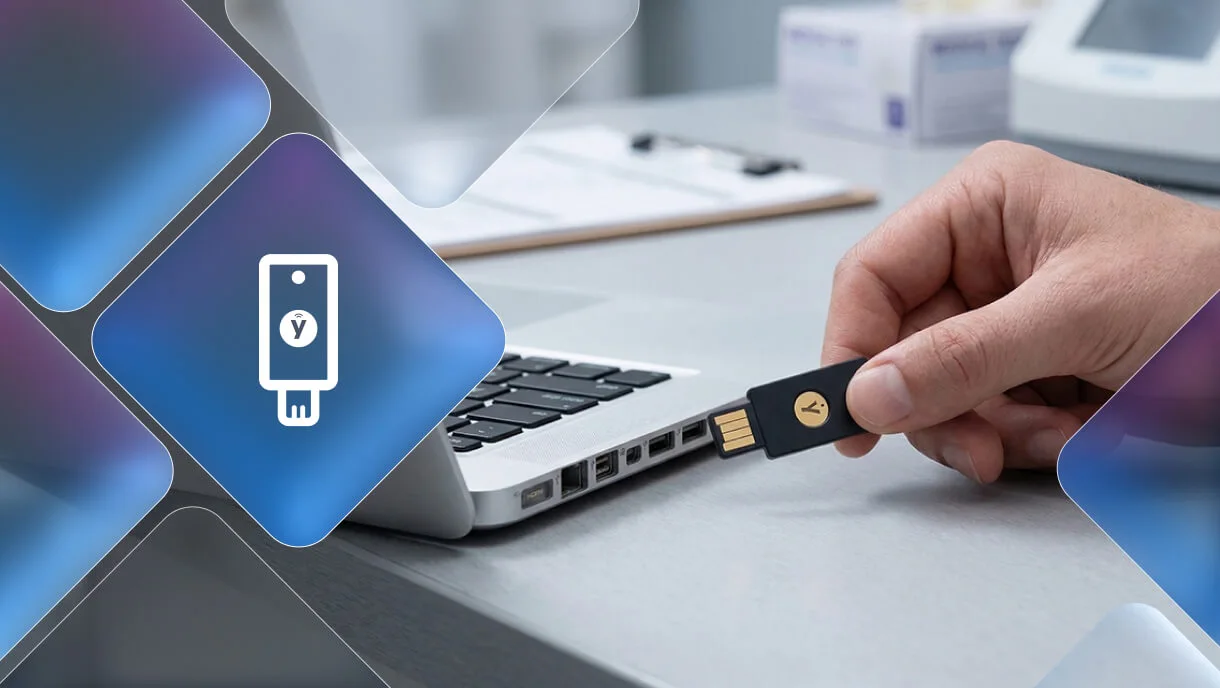
Understanding what a YubiKey is starts with recognizing what makes it fundamentally different from every other authentication method. A YubiKey is a hardware security device that authenticates users through public-key cryptography rather than shared secrets. It looks like a small USB flash drive. You plug it in, press a button, and you are authenticated. No code to retrieve, no app to open, no password to remember.
A YubiKey does not store your passwords. It does not function as a VPN. It does not replace antivirus software or endpoint protection. It handles one critical job: verifying your identity at login. And it does that job better than almost any other tool available.
How Does a YubiKey Work?
The Secure Element Chip
Every YubiKey contains a secure element, a dedicated chip that generates and stores private cryptographic keys. Those keys never leave the device. No export function exists. Even with physical access to a stolen YubiKey, extracting the private key requires specialized lab equipment far beyond the reach of typical attackers.
What Happens When You Touch the Button
The touch requirement does more than confirm your presence. It proves a human, not malware, is initiating the authentication. The YubiKey uses capacitive sensing rather than a mechanical trigger, so automated scripts cannot fake it. Each touch approves exactly one operation. After 8 incorrect PIN attempts, the device locks itself automatically.
YubiKey Authentication Flow
Here is exactly what happens when you log in using a YubiKey:
- You attempt to log in to a supported service.
- The service sends a cryptographic challenge to your browser.
- Your browser passes the challenge to the YubiKey.
- You enter a PIN or touch the sensor to confirm presence.
- The YubiKey signs the challenge using its stored private key.
- The signed response returns to the service, which verifies it against the stored public key.
- Access is granted.
The YubiKey binds authentication to the exact website domain registered during setup. A phishing site with a slightly different URL gets rejected at the protocol level, not by user attention. This is what makes hardware-based authentication structurally phishing-resistant.
OTP Authentication Flow
For legacy systems, the YubiKey generates a 44-character one-time password encrypted with AES-128 when you press the button. The code auto-fills into the active input field. The service validates it against Yubico's servers or your organization's private validation server. Each code is used once and immediately invalidated.
Core Protocols of a YubiKey
FIDO2 / WebAuthn
FIDO2 WebAuthn is the modern standard. Enables fully passwordless login. The private key never leaves the YubiKey, and authentication binds to the registered domain, making phishing structurally impossible.
FIDO U2F
The predecessor to FIDO2. Adds a strong second factor on top of a password. Supported by Google, GitHub, Facebook, and thousands of other services.
OTP (One-Time Password)
Supports legacy systems. The YubiKey generates a 44-character Yubico OTP or standard OATH-TOTP codes, far stronger than 6-digit app codes, and is generated by isolated hardware rather than software, sharing a device with vulnerable apps.
PIV Smart Card and OpenPGP (for Enterprise)
Supports smart card authentication for Windows login, SSH certificate authentication, and digital document signing. Essential for government, defense, and regulated industries requiring PIV compliance.
YubiKey vs. Every Alternative
| Method | Phishing Resistance | Network Required | Code Strength | Physical Presence |
|---|---|---|---|---|
| YubiKey | High (domain-bound) | No | 44 chars / cryptographic | Yes |
| SMS 2FA | Low (SIM-swap risk) | Yes | 6 digits | No |
| Authenticator App | Low (relay attacks) | For sync | 6 digits | No |
| Platform Passkeys | High | No | Cryptographic | Biometric |
| Google Titan Key | High | No | Cryptographic | Yes |
| Biometrics alone | Medium | Varies | Biometric | Yes |
YubiKey vs. SMS 2FA: SMS is interceptable, SIM-swappable, and carrier-dependent. YubiKey operates entirely offline.
YubiKey vs. Authenticator Apps: Apps generate phishable 6-digit codes and depend on a charged phone. YubiKey generates 44-character AES-128 encrypted codes and requires no battery, no network, and no manual entry.
YubiKey vs. Platform Passkeys (Face ID/Windows Hello): Platform passkeys sync across devices via cloud accounts, increasing the attack surface. YubiKey passkeys are device-bound and cannot be copied or synced to any other device.
YubiKey vs. Google Titan Key: Titan supports FIDO2 and WebAuthn only. YubiKey adds OTP, PIV smart card, and OpenPGP, making it significantly more versatile for enterprise environments with legacy systems.
YubiKey vs. Biometric Authentication: Biometrics cannot be changed if compromised. The YubiKey Bio series combines fingerprint verification with hardware-bound cryptography, keeping all biometric data entirely on the device itself.
Should You Use a YubiKey?
A YubiKey is the right choice if:
- You manage admin accounts, production systems, or privileged access, where a single breach causes organization-wide damage
- Your threat model includes targeted phishing, not just automated credential stuffing
- You operate in a regulated environment that mandates hardware-backed MFA (FIPS, NIST AAL3, HIPAA, PCI)
- Your users sit at dedicated workstations and can realistically carry and manage a physical device
It may not be the right fit if:
- Your workforce rotates across shared devices throughout a shift
- Users work in environments where carrying or tracking a physical token creates operational friction
- You need to scale authentication across thousands of frontline workers quickly and without hardware logistics
That last point sets up the OLOID section naturally later without forcing it.
What is a YubiKey Used For?
When people ask what is a YubiKey used for, the answer spans individual account protection all the way to enterprise-wide zero-trust architectures.
Personal Account Security: Google, Microsoft, GitHub, Dropbox, Reddit, and password managers like Bitwarden and 1Password all support YubiKey authentication natively.
Enterprise and Workforce Authentication: Organizations use YubiKeys for SSO portals, VPN access, remote desktop authentication, and privileged access management. In environments with shared workstations such as manufacturing floors, logistics hubs, and hospital nursing stations, hardware authentication removes the credential-sharing habits that password-based systems quietly encourage. A worker plugs in the key, authenticates, works, removes the key, and the session closes cleanly.
Developer Use Cases: Signing Git commits, authenticating SSH sessions, publishing packages to registries, and securing cloud infrastructure access on AWS IAM, Azure AD, and GCP.
Compliance-Driven Environments: YubiKey 5 FIPS satisfies NIST AAL3, CMMC Level 3, HIPAA MFA requirements, PCI DSS Requirement 8.3, and DEA EPCS standards for electronic prescriptions of controlled substances.
How to Set Up Your YubiKey
Step-by-Step Setup:
- Plug your YubiKey into a USB port.
- Go to yubico.com/setup and select your device model.
- Browse compatible services under the "Compatible accounts and services" section.
- Follow the video or text instructions provided for each service you want to protect.
Setting Up with Google:
- Go to your Google Account, then Security, then 2-Step Verification.
- Click "Add security key" and insert your YubiKey when prompted.
- Touch the key's sensor when the browser requests it.
- Name the key for easy identification and save.
Configuring PIN Protection: Open YubiKey Manager, navigate to Applications, then PIV, then Configure PIN. Set a 6 to 8-digit PIN. Test it by removing and reinserting the key to confirm the PIN prompt appears correctly.
Fixing the Accidental Trigger Problem: Nano models trigger on any touch, causing them to paste a 44-character code into the currently active text field. Fix this by opening YubiKey Manager, going to Applications, then OTP, and clicking Swap to exchange Slot 1 (Short Touch) and Slot 2 (Long Touch). OTP now only fires after a 3-second hold.
Enterprise Deployment Guide
Provisioning and Rollout
Register two keys per user: one primary and one backup. Use Yubico's Works with YubiKey catalog to audit service compatibility across your stack before deploying organization-wide. Set PINs on all keys before distributing them to employees, and document the rollout inside your IT onboarding checklist.
Employee Offboarding and Revoking a YubiKey
When an employee leaves, revoke their registered keys across all services immediately. Most identity platforms, including Okta, Azure AD, and Active Directory, support bulk FIDO2 credential revocation through admin consoles. Revoke the credential server-side first. Do not rely on physical key return alone, because the credential lives on the server and remains valid until explicitly removed.
YubiKey as a Service (YKaaS)
Yubico offers a subscription-based procurement model for enterprises managing large-scale deployments. YKaaS covers predictable inventory management, centralized purchasing, and managed replacement cycles. It works particularly well for distributed organizations with hundreds or thousands of employees across multiple locations.
Integration with Active Directory, Okta, and Azure AD
YubiKey integrates natively with Microsoft Entra ID (Azure AD), Okta, and Active Directory through FIDO2/WebAuthn and smart card PIV protocols. PingID supports YubiKey OTP and FIDO2/U2F for enterprise MFA.
Account Capacity Limits
How Many Accounts Can One YubiKey Handle?
For FIDO2 resident credentials (passkeys stored directly on the key): 25 on most models and up to 100 on the Security Key Series. For non-resident credentials: unlimited, because the key derives authentication from server-side data rather than storing it locally. For OATH-TOTP codes: 32 slots. Choose which accounts get hardware-stored credentials with care, and prioritize high-value systems for resident storage.
Resident vs. Non-Resident Credentials Explained
Resident credentials enable usernameless login. You insert the key, touch it, and authentication completes with no username entry needed. Non-resident credentials require username entry first, but support unlimited service registrations. Most enterprise deployments use non-resident credentials for general services and resident credentials for high-privilege passwordless flows.
What If You Lose Your YubiKey?
Register a Backup Key First
Before depending on any YubiKey, register a second one for every service you care about. Store the backup in a secure, separate location and keep it out of the same bag as your laptop or primary device.
Save Recovery Codes Offline
Most services generate one-time recovery codes during MFA enrollment. Print them and store them in a locked location. These codes serve as your final fallback if both keys become unavailable simultaneously.
Enterprise Recovery Planning
Define a formal recovery workflow before anyone loses a key. When an employee reports a missing key, IT should immediately revoke server-side credentials, issue temporary access through a secondary method, and ship a replacement key with a clear timeline. Audit backup key registration rates quarterly. An employee without a registered backup key is a support incident waiting to happen.
Security Best Practices
Physical Security of the Key: Treat your YubiKey the way you treat a building access card. Attach it to a lanyard in high-activity environments. Never leave it in an unattended laptop and never loan it to a colleague.
Backup Strategy: Two keys minimum per user. Register both to every critical service before the primary key enters active use. Do not register the backup after a crisis.
Monitoring and Logging Authentication Events: Log every MFA authentication event, especially backup code usage, which often signals either a lost key or an active account compromise. Set automated alerts for geographic anomalies and repeated authentication failures.
User Education: Build YubiKey instructions into onboarding flows directly. Create contextual prompts inside your login interface rather than relying on documentation pages that users will close without reading. Short friction at onboarding prevents major friction at incident response.
Where Does OLOID Fit?
Most conversations about what is a YubiKey focus on desk workers, developers, and cloud-connected knowledge workers. The harder authentication problem sits elsewhere: nurses rotating across shared workstations, warehouse associates clocking in on shared terminals, and manufacturing technicians accessing control systems between shift changes. In these environments, standard MFA either gets bypassed entirely or creates enough friction to slow operations.
OLOID addresses passwordless authentication specifically for frontline workers and shared-device environments where traditional YubiKey deployments do not translate easily. While a YubiKey excels at securing a dedicated workstation for a knowledge worker, OLOID’s passwordless SSO platform handles the operational reality of shift-based access, high-turnover workforces, and environments where workers cannot easily manage physical tokens or authenticator apps mid-shift.
If your organization spans both worlds, corporate users and frontline operational staff, your authentication strategy needs to account for both layers. A YubiKey secures the administrator. Platforms built for frontline environments secure the floor.
FAQs
1. What is a YubiKey in the simplest terms?
A YubiKey is a physical USB or NFC key that proves your identity using cryptography instead of passwords. You plug it in, press a button, and you are authenticated.
2. Can one YubiKey work across multiple devices?
Yes. The YubiKey stores no device-specific data. Plug it into any compatible computer or tap it on any NFC-enabled phone, and it authenticates the same accounts.
3. Does a YubiKey work without internet?
The cryptographic operations on the key itself work entirely offline. The service you are authenticating to may still require connectivity to verify the signed response.
4. Can the YubiKey be hacked remotely?
The private key never leaves the secure element chip. Remote extraction is not technically possible with current methods.
5. What happens if an employee changes roles?
Revoke their registered FIDO2 credentials from the previous role's systems through your identity platform's admin console, then register the same key to the new set of systems. The physical key does not need replacement.
6. Is a YubiKey worth the cost for small businesses?
For any team handling sensitive data, including customer records, financial systems, or source code, the $50 per key cost is negligible against the $4.88 million average cost of a credential-based breach reported in the IBM Cost of a Data Breach Report 2024.



Get the latest updates! Subscribe now!
