




Passkey Implementation: A Practical Guide for Engineering Teams in 2026

Key Takeaways
- Passkey implementation replaces the shared secret model with public-key cryptography; no password travels over the network, and no phishing vector exists
- The gap between a proof of concept and a production-ready passkey implementation is where most engineering teams stall: account recovery, shared device architecture, and compliance documentation all need to be solved upfront
- Build vs. buy is a real decision: passkey implementation from scratch requires dedicated identity engineering capacity, ongoing credential lifecycle management, and a recovery flow your team owns entirely
- Frontline and shared device environments need a different architectural approach; standard passkey implementation assumptions around personal devices and one-to-one device ownership break down on hospital floors, warehouses, and manufacturing terminals
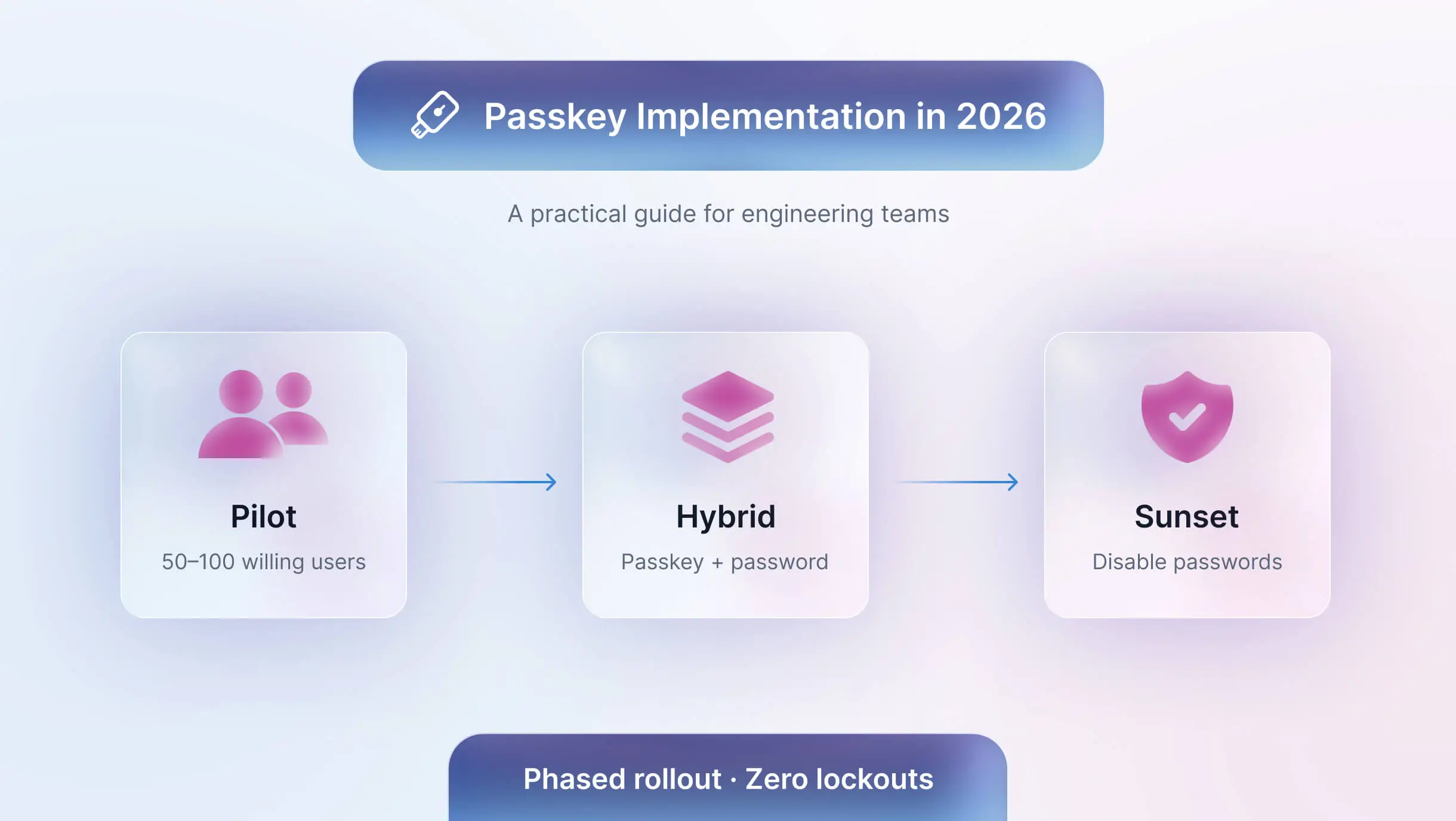
- A phased rollout; pilot, hybrid mode, then password sunset, consistently outperforms a hard cutover, both in adoption rates and in the volume of support tickets generated
Most passkey implementations don’t fail at the cryptography. They fail at rollout. What engineers are now staring at is the harder question: how do we actually ship this without breaking things for the people who depend on it every day? Most engineering teams that look into passkey implementation already believe the technology works. The FIDO Alliance's World Passkey Day 2025 report confirms the momentum: 87% of enterprises have deployed or are actively deploying passkeys, up 14 percentage points from two years ago. The question has shifted from "should we do this?" to "how do we actually do this without breaking things?"
That second question is harder than it looks. The WebAuthn spec is solid, and the browser support is there. But the gap between a working proof of concept and a production rollout that handles account recovery, shared device environments, phased migration, and compliance documentation.Most passkey projects stall for 3–6 months at this stage and this is where teams abandon rollout” . Frontline environments add another layer. When workers share terminals across shifts in a hospital, warehouse, or manufacturing floor, standard passkey assumptions about personal devices and one-to-one device ownership no longer apply. The architecture has to account for that from the start.
This guide covers the decisions that actually determine whether your passkey implementation ships cleanly or becomes a six-month detour: how to evaluate passkeys against your existing auth stack, how to choose between building and buying, how to design a recovery flow that does not reintroduce the risks you are trying to eliminate, and how to roll it out in phases without a single user getting locked out.
Why Passkeys, and Why Now
According to Gartner, between 20% and 50% of all IT helpdesk calls are password-related. For organizations running shift-based operations with shared terminals, that volume compounds across every handoff. Beyond budget, the Verizon 2024 DBIR found that stolen credentials appear as an initial access vector in nearly one-third of all confirmed breaches. Traditional MFA reduces the risk but still puts a password underneath the second factor.
The password problem has become an operational problem
Shared device environments make this worse in specific ways. When six people use the same terminal across a shift, password hygiene breaks down structurally. People share credentials, write them on sticky notes, or leave sessions open. Policy enforcement alone does not close this gap; architecture does.
What passkeys actually solve
Passkeys eliminate the shared secret. The private key lives on the user's personal device or a registered authenticator. The server stores only a public key, which has no value to an attacker on its own. Passkeys also resist phishing by design because the cryptographic handshake binds each credential to a specific domain. A fake login page receives nothing usable.
Passkeys versus your other options
Engineering teams evaluating passkeys rarely start from zero. They already run something, and they need to understand where passkeys fit relative to what they have.
Passkeys vs. magic links: Magic links offer a passwordless experience but require email access at login time. For frontline workers without corporate email on their devices, or in environments with poor connectivity, magic links create their own friction. Passkeys work entirely on-device.
Passkeys vs. TOTP/authenticator apps: TOTP apps add a second factor but keep the password in the flow. They also require users to retrieve a code from a separate app, adding steps. Passkeys collapse registration and verification into a single biometric gesture.
Passkeys vs. SSO: SSO centralizes access effectively but depends on session management and often still requires a password to establish the initial session. Passkeys pair well with SSO rather than competing with it: you can use passkeys to authenticate into the SSO provider itself, removing the password at the root.
When passkeys may not fit: Passkeys work best when users have a consistent personal device or a registered hardware authenticator. In environments where workers have no personal device and share hardware without individual authenticator registration, the implementation requires more architectural planning before it delivers value.
Build versus buy: how to decide
Most articles tell you to use SimpleWebAuthn or sign up for a managed platform. Neither answer is universally correct.
What building from scratch actually requires
A self-built passkey implementation needs four server endpoints: generate registration options, verify registration, generate authentication options, and verify authentication. The server must handle cryptographic verification, challenge generation, and credential storage (credential ID, public key, sign count, transport types). The client needs helpers to convert between ArrayBuffers and Base64URL encoding because WebAuthn uses binary formats that JSON does not handle natively. HTTPS is mandatory everywhere except localhost.
The ongoing cost includes maintaining credential lifecycle management, building a user-facing credential management UI, and handling the account recovery flow yourself.
What managed services handle for you
Platforms that specialize in passkey implementation handle the cryptographic layer, credential storage, cross-device sync logic, conditional UI rendering, and compliance documentation. Integration typically reduces to an API call and a pre-built UI component. The tradeoff is vendor dependency and recurring cost.
Decision criteria
Choose to build when your team has dedicated identity engineering capacity, your compliance requirements demand full data sovereignty, and your timeline allows for proper testing. Choose a managed service when your team needs to ship in weeks, when you operate in a regulated industry and want audited infrastructure from day one, or when your user base spans environments as diverse as mobile devices, shared kiosks, and desktop terminals. Most passkey platforms assume personal devices. OLOID is built for shared environments where that assumption fails. If your environment includes shared devices or frontline workers, most off-the-shelf passkey implementations will fail without additional architecture. OLOID is designed specifically for this use case.
Implementation essentials every approach shares
Regardless of whether you build or buy, the same requirements apply.
Infrastructure prerequisites: Your domain must serve over HTTPS. Your Relying Party ID must match your domain exactly. Your database schema needs to store the credential ID, public key, sign count, and transport types per user.
Registration flow: The user triggers registration. Your server generates a unique cryptographic challenge. The browser calls navigator.credentials.create() with those options. The user verifies via biometric or PIN. The browser returns a public key and an attestation object. Your server verifies the response and stores the credential.
Authentication flow: The user initiates login. Your server generates a new challenge. The browser calls navigator.credentials.get(). The user verifies via biometric or PIN. The browser returns a signed assertion. Your server verifies the signature against the stored public key and creates a session.
Three implementation gotchas: Never reuse a challenge. Set residentKey: 'required' during registration if you want a discoverable credential (the passkey that appears in the OS picker without requiring a username first). Set userVerification: 'preferred' rather than 'required' to avoid failures on devices without biometrics.
Account recovery
Recovery is where passkey implementations win or lose user trust. A user who loses their only registered device and cannot get back in will revert to passwords the moment you offer a fallback.
What happens when a user loses their device
Design recovery around identity verification, not credential reset. The strongest pattern: send a time-limited magic link to a verified email, prompt the user to re-verify their identity, then walk them through registering a new passkey on their replacement device. Never make the recovery path a weaker authentication method that an attacker can deliberately trigger.
Designing a recovery flow that does not reintroduce risk
Require users to register at least two passkeys at setup time: one on their primary device and one on a backup device or hardware key. Surface this as a feature, not a warning. Frame it as "set up a backup so you never get locked out," and adoption rates for dual registration rise significantly.
Rolling out passkeys without disrupting users
Phase 1: Pilot with a willing cohort
Pick 50 to 100 users who actively want to try it. Measure registration completion rate, login success rate, and support tickets generated. Fix what breaks before expanding.
Phase 2: Hybrid mode
Keep passwords active. When a user authenticates with a password, surface a single non-intrusive prompt: "Want to sign in faster next time? Set up a passkey now." Do not interrupt the session. Let adoption grow organically. This is where organizations running shared workstation environments see the clearest signal: workers on shared terminals who register a personal device as their authenticator stop fighting the login screen entirely.
Phase 3: Sunsetting passwords
Once passkey adoption crosses 80% of active users, disable password login for that cohort. Keep the recovery flow active. Track the ratio of recovery events to total logins monthly. When that ratio drops below 1%, passwords are no longer load-bearing in your system.
Metrics to track during rollout
Monitor registration completion rate, authentication success rate, recovery event rate, and IT support tickets related to login. A healthy passkey implementation drives all four numbers in the right direction within 60 days of full deployment.
Security trade-offs to understand before you ship
Passkeys raise the security floor significantly, but they introduce their own trade-offs that your team needs to understand before you go to production. Here is what to evaluate:
Synced passkeys and cloud account risk
Synced passkeys stored in iCloud Keychain or Google Password Manager inherit the security of those accounts. If a user's Apple ID or Google account is compromised, their synced passkeys go with it. For high-security environments, device-bound passkeys stored in hardware (on a FIDO2 security key or a device's secure enclave without sync enabled) offer stronger guarantees at the cost of more complex recovery.
Device-bound versus synced passkeys
Synced passkeys offer convenience and natural cross-device availability. Device-bound passkeys offer stronger isolation. Most consumer and operational deployments start with synced passkeys and gradually migrate select user cohorts (administrators, privileged users) to device-bound credentials.
Compliance and regulatory fit
Authentication compliance used to mean checking a box. Passkeys change that calculus by satisfying multiple regulatory requirements through a single technical decision.
NIST SP 800-63 / AAL2 in plain language
Passkey-based authentication satisfies NIST's AAL2 requirements because it combines something the user has (the device) with something the user is (biometric) or knows (PIN), without transmitting either factor to the server. Regulated industries can cite this standard directly when documenting authentication controls.
Passkeys in healthcare, manufacturing, and critical infrastructure
Regulated environments benefit from passkeys beyond security posture. In healthcare, faster login at shared terminals directly affects clinical workflow and documentation timeliness. In manufacturing and logistics, reducing login friction at operational consoles reduces the temptation to leave sessions open between shifts. Identity platforms designed for these environments, like OLOID, address these sector-specific requirements with controls built for operational realities rather than retrofitted from consumer use cases.
Getting started: your next step
Passkey implementation has moved from emerging practice to engineering standard in under three years. The infrastructure is mature, browser support is near-universal, and the library ecosystem covers every major stack.
The teams that will struggle are the ones that treat passkey implementation as a drop-in swap for passwords rather than a structured migration. Start with the recovery design, run a pilot, and track the metrics. And if your environment serves frontline workers on shared devices or operates under regulatory compliance requirements, evaluate whether a platform built for that context gets you there faster than building from scratch.
FAQs
1. What is passkey implementation, and how is it different from adding MFA?
Passkey implementation replaces the shared secret model entirely. MFA adds a second verification step on top of a password. Passkeys remove the password from the equation, using a cryptographic key pair where the private key never leaves the user's device, making credentials impossible to phish or steal from a server breach.
2. Which browsers and operating systems support passkeys today?
All major browsers, including Chrome, Safari, Firefox, and Edge, support WebAuthn natively. At the OS level, passkeys work on iOS 16+, Android 9+, Windows 10/11, and macOS Ventura and later. Google reports that passkeys achieve a 4x higher login success rate compared to passwords, reflecting how mature cross-platform support has become.
3. How do you handle passkey implementation on shared devices or for frontline workers?
Shared terminals in hospitals, warehouses, and manufacturing floors break standard passkey assumptions about personal device ownership. The fix is device-bound credentials on registered hardware authenticators combined with individual biometric enrollment per worker, rather than synced passkeys tied to a personal device.
4. What happens when a user loses their device?
Have users register at least two credentials at setup: one primary device and one backup. On loss, verify identity via a time-limited magic link to a verified email, then re-enroll a new passkey. Never make the recovery path a weaker auth method that an attacker can deliberately trigger.
5. Does passkey implementation satisfy NIST or HIPAA compliance requirements?
Yes. NIST SP 800-63-4, finalized in July 2025, explicitly requires phishing-resistant authentication at AAL2 and formally recognizes synced passkeys as valid AAL2 authenticators. Healthcare organizations can cite this directly when documenting technical safeguards under HIPAA. Fintech and critical infrastructure teams get the same compliance coverage.


Get the latest updates! Subscribe now!
