




Leveraging Facial Authentication for Worker identity: The OLOID Approach
This blog explores how OLOID leverages facial authentication technology to enhance worker identity verification in industrial and workplace environments. It explains how OLOID’s FaceVault platform ensures privacy and data protection by using encrypted digital templates instead of storing complete facial images. Learn how OLOID’s approach balances security, convenience, and ethical use of biometric technology to enable safe, contactless access control and attendance management.

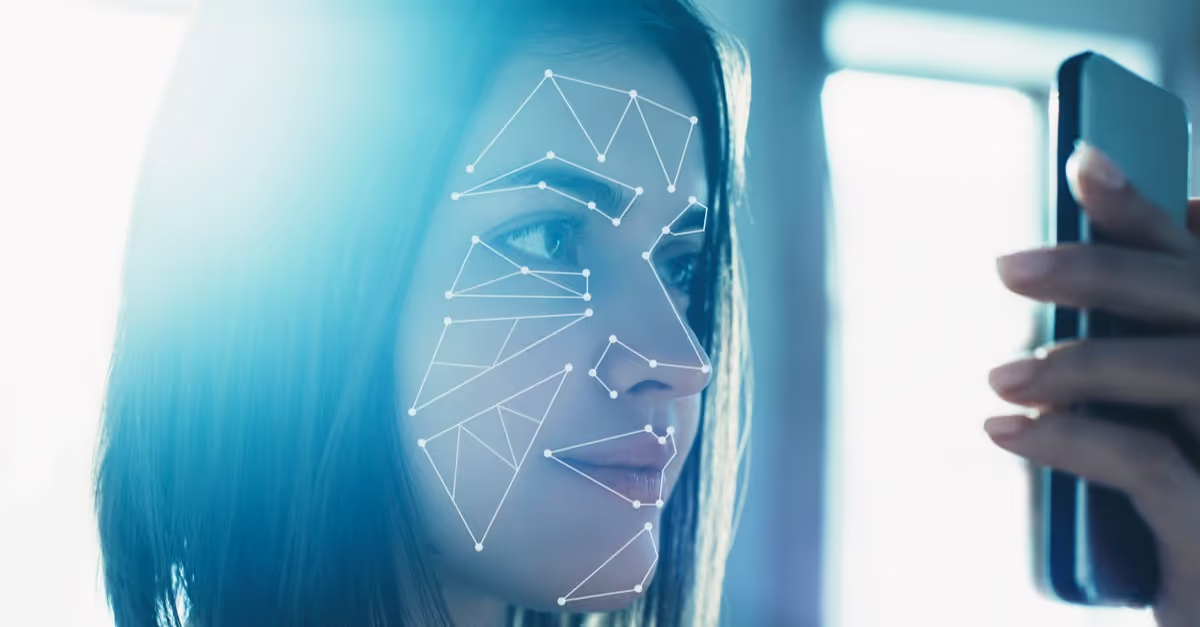
Contactless biometric technology is not new. However, in recent months, we have seen a steep rise in the use of contactless technology in business operations. This is so because contactless interactions in work environments have become crucial at the moment and this new behavior is slowly becoming entrenched. Among the different contactless solutions, facial authentication is emerging as a leading technology with businesses trialing face-based solutions to replace high-touch points such as fingerprint readers and keypads for entering secured work areas.
This is particularly relevant for industrial environments where the use of a personal mobile device cannot be assumed. While facial recognition presents a very strong value proposition, concerns around facial data storage, access and privacy are preventing few businesses from harnessing its potential.
Over the next 5 mins, I hope to address those concerns by explaining two key considerations that shape Oloid’s FaceVault Platform.
Facial recognition as a face authentication technology
In a world where technology pervades our day to day lives, many critics of facial recognition argue that the technology infringes on people’s privacy. Even San Francisco, the Mecca of technology and innovation, banned the use of facial recognition by the government amid fears that the technology could possibly lead the state in the direction of a surveillant state. This is a valid concern because when facial recognition is used as a surveillance tool, it violates individual rights.
However, there are many legitimate and privacy-forward uses of facial recognition technology that do not infringe individual data rights. Most current uses of facial recognition technology in private work environments such as offices and factories relate to user authentication as opposed to user surveillance. In face-based authentication, the user collaborates in the process of enrolment of face. This means that an application that uses facial recognition for user authentication verifies the identity of an individual who wants to be identified. This is very different from surveillance applications that use facial recognition technology to identify individuals who don’t necessarily want to be identified.
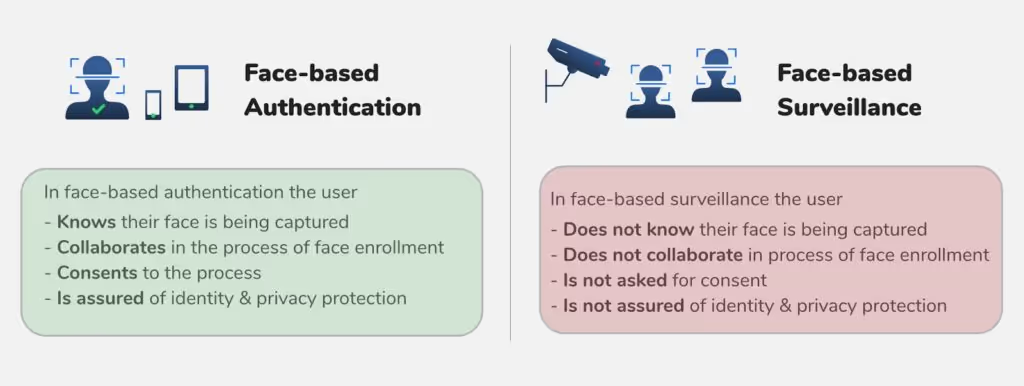
Our customers have integrated Oloid’s FaceVaultTM platform into legacy systems, such as Time & Attendance and Access Control systems primarily for employee authentication using face. With a focus on privacy, FaceVault is designed to obtain consent before collecting the employee’s facial biometric data. Once collected, facial data is used in ways that are compatible with employee expectations - user authentication within the work premise. The Oloid facial recognition algorithm is triggered only when an employee shows an intent to be authenticated. That is, an employee's face is captured for facial - based authentication only when the employee presents her face to verify herself to clock in or gain authorized access to turnstiles and doors.
Face data stored as digital templates not as whole images
Storage of personally Identifiable information (PII) that traditionally included information like name, date of birth, place of residence, credit card information, phone number, race, gender, criminal record, age, and medical records has long been under scrutiny. With the rapid evolution of biometric technology, biometric data is widely used as personally Identifiable information data, replacing traditional methods of authentication such as badges, logins and passwords. However, unlike the traditional PII data, Biometric data is sensitive and immutable which makes it imperative for organizations to invest in more secure storage to maximize user privacy.
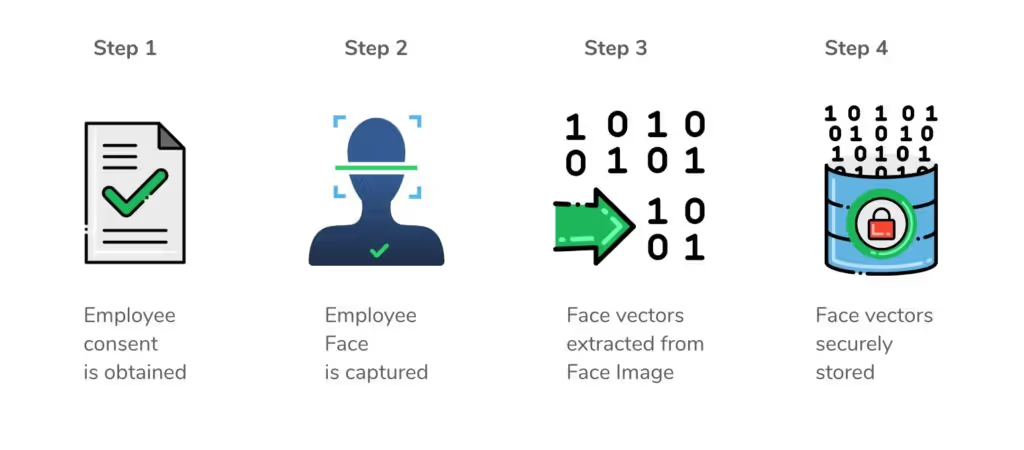
OLOID's FaceVaultTM platform is designed to protect the privacy and integrity of the personal information against risks such as unintended or inappropriate disclosure and unauthorized access. Once an employee provides consent for her face to be captured for the purpose of authentication within the work premise, a face image of the employee is taken. Oloid’s underlying face detection algorithm detects the face in the reference image, extracts facial features vector (facial landmarks such as left eye, right eye, nose, moth), and then stores the digital template of the face - algorithmically derived representation of face data - in OLOID's secure database. The face image of the employee is not of much use from this point and may be discarded. The digital template of the face is meaningless on its own and by itself cannot be linked to an employee. Also, the encrypted digital template cannot be reverse engineered to reconstruct the face, rendering it useless to a hacker.
Conclusion
As any technology, facial recognition can be used in various ways and for different purposes (e.g. private security, commercial, public security, government and law enforcement). The question to be asked is if Facial recognition technology is being used thoughtfully and responsibly. Everyday, thousands of factory workers trust Oloid’s face-authentication based Time Clocks to clock in and out at the start and end of each shift. Our clients have partnered with us to deploy hundreds of face-authentication based access points to secure and protect sensitive work areas. Oloid is committed to use facial recognition technology responsibly which means ensuring appropriate transparency, accountability, stakeholder education and identity & privacy protection.


Get the latest updates! Subscribe now!

