




Why SMEs Should Opt for Mobile Access Control Systems/Solutions
This blog discusses why small and medium-sized enterprises (SMEs) should consider adopting mobile access control solutions for their security needs. Learn about the key technologies, advantages such as security, convenience, and scalability, and best practices for choosing the right solution. The article also outlines how these systems can save costs, improve management, and seamlessly integrate with existing infrastructure for growing businesses.

Lost access cards create hurdles for SME owners and managers. Forgotten keys trigger emergency lockouts at the worst possible times. Traditional access control systems demand constant attention from already stretched teams. For businesses with 10 to 200 employees, managing physical credentials distracts from actual business growth.
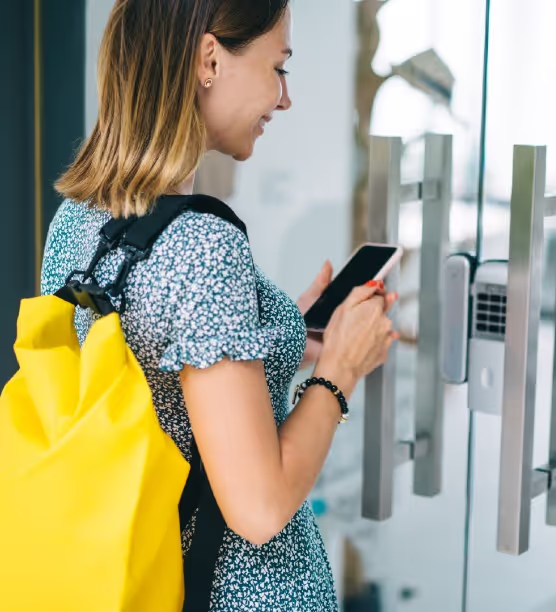
Your employees already carry the perfect solution everywhere they go. Smartphones handle their daily work tasks from communication to scheduling. These devices can now function as secure digital keys for your facilities. Mobile access control eliminates plastic cards, metal keys, and administrative burdens with a single smart upgrade.
Why SMEs are switching to mobile access control:
- Budget-friendly pricing with 50% lower costs and flexible pay-as-you-grow models
- No IT expertise needed through simple cloud platforms anyone can manage
- Instant employee updates for onboarding new hires or removing departed staff
- Remote monitoring capability to control facility access from anywhere, anytime
- Future-proof technology that scales seamlessly across locations and access points
This guide covers everything SMEs need to know about mobile access control. You'll discover core technologies and how they work in real business environments. We'll share practical selection criteria for choosing the right solution. By the end, you'll have a clear path to modernizing facility security affordably.
What is a Mobile Access Control System?
A Mobile Access Control System (MACS) replaces physical keys, cards, and fobs with secure digital credentials stored on smartphones. Users unlock doors, gates, and secured areas by tapping or approaching readers with their mobile devices. The system uses technologies such as Bluetooth Low Energy (BLE) and Near Field Communication (NFC) to authenticate credentials instantly. Organizations manage all access permissions remotely through a cloud-based platform that enables real-time control.
Administrators can issue, update, or revoke access credentials immediately without physical card distribution or collection. The digital credentials use advanced encryption to prevent duplication and unauthorized access. This approach streamlines operations while improving both security and user experience across all facilities.
How Mobile Access Control Systems Work?
Mobile access control systems transform smartphones into secure digital keys that communicate with door readers. Users simply approach a door, tap their phone, or open an app to trigger authentication. The system verifies encrypted credentials against a cloud-based or local server in milliseconds. Valid credentials automatically unlock the door, eliminating physical cards and enabling touchless, remotely managed security.
The technology operates through five connected components:
1. Digital Credentials
A secure, encrypted key provision to the user's smartphone or smartwatch through a dedicated mobile app. This digital credential replaces plastic cards and is stored securely on the device. Administrators can issue credentials remotely, eliminating physical distribution and card-printing costs.
2. Wireless Communication
The mobile device uses low-energy wireless technology to transmit credentials when approaching a door:
- Bluetooth Low Energy (BLE): Connects from several feet away, enabling hands-free, touchless access as users approach.
- Near Field Communication (NFC): Requires the phone to be within a few inches, like tap-to-pay systems, for enhanced security.
- QR Codes: Scannable codes serve as backup credentials for devices without BLE or NFC capabilities.
3. Reader and Controller
The door reader captures credential data from the mobile device and transmits it to an Access Control Unit (ACU) or control panel. The ACU connects to cloud-based management platforms or local servers for real-time verification. This hardware acts as the bridge between mobile credentials and physical door locks.
4. Credential Verification
The ACU checks received credential data against authorized access rules stored in the system software. The verification process confirms user identity, access permissions, time restrictions, and location authorization. The system logs every access attempt for audit trails and security monitoring.
5. Door Unlock
When credentials validate successfully, the controller signals the electronic lock to release. Magnetic locks or electric strikes disengage to grant entry. The entire process completes in under a second, creating a seamless user experience while maintaining security protocols.
Mobile Access Control System Technology
Mobile access control systems turn everyday devices into secure building credentials. Smartphones, smartwatches, and tablets replace traditional plastic cards and metal keys entirely. Both Android and iOS platforms support nearly all modern mobile access solutions. This universal compatibility means your existing employee devices work without requiring special hardware purchases.
These systems work through wireless communication between mobile devices and access readers. When an authorized device comes within range, readers recognize the signal instantly. Doors, gates, turnstiles, and other entry points unlock automatically without manual intervention. Several proven technologies power this seamless access experience for businesses.
1. Bluetooth Low Energy (BLE)
BLE offers the most convenient hands-free access experience available today. The technology detects authorized devices from several feet away through walls and doors. Employees simply walk up to an entry point while their phones remain in their pockets or bags. Access readers automatically recognize authorized signals and grant entry within milliseconds.
Best for: Offices where employees frequently move between rooms or buildings throughout the day.
2. Cloud-Based Access Control
Cloud platforms store all credentials and access permissions in secure online databases. You can monitor facility access and update permissions from anywhere with internet connectivity. This eliminates the need for expensive on-site servers that require dedicated IT maintenance and physical space. Updates happen instantly across all your locations without visiting each site individually.
Best for: Multi-location SMEs or businesses with remote management needs and limited IT resources.
3. QR Code Access
QR codes provide the most straightforward and most affordable mobile credential option. Each employee or visitor receives a unique scannable code on their smartphone. Scanning takes just seconds at any entry point equipped with an introductory camera reader. You can track complete activity logs showing exactly when individuals enter and exit facilities.
Best for: Visitor management, temporary contractor access, or budget-conscious SMEs starting their digital transition.
4. Near-Field Communication (NFC)
NFC uses the same proven technology behind contactless payment systems at retail stores. Employees tap their smartphone against a reader just like paying with Apple Pay or Google Pay. The technology requires proximity for security purposes, typically within a few inches. Users hold their device near the scanner for approximately five seconds to authenticate.
Best for: High-security areas that require deliberate authentication rather than automatic hands-free access.
5. Physical Control Panel Systems
Control panels serve as the command center connecting your mobile credentials to physical barriers. These systems include electronic locks, RFID-enabled doors, automated gates, and turnstile mechanisms. Modern panels integrate seamlessly with mobile technologies while maintaining compatibility with existing infrastructure. This flexibility lets you upgrade gradually without replacing functional equipment.
Best for: Businesses upgrading from legacy systems that want to preserve existing physical infrastructure investments.
Advantages of Mobile Access Control Systems
Mobile access control systems deliver tangible benefits that extend beyond replacing plastic cards with smartphones. Organizations experience immediate improvements in security posture, operational efficiency, and cost management after deployment. These advantages compound over time as systems integrate deeper into business processes and infrastructure. The following benefits demonstrate why enterprises across industries are prioritizing mobile credentials in their security strategies.
Enhanced Security with Multi-Factor Authentication
Mobile credentials leverage smartphone security features such as biometrics, PINs, and device encryption to provide stronger authentication. The system verifies both the digital credential and the authorized user's identity through facial recognition or fingerprints. This multi-layered approach prevents unauthorized access even if credentials are compromised or stolen. Organizations reduce security risks while maintaining compliance with industry regulations and data protection standards.
Elimination of Physical Credential Costs
Digital credentials eliminate recurring expenses for card printing, replacement, and distribution across facilities. Organizations save thousands annually by removing plastic card inventory, printers, and encoding equipment from budgets. Lost or damaged smartphones don't require new credentials, since administrators can remotely provision access to replacement devices. These cost savings accumulate significantly in enterprises with high employee turnover or large distributed workforces.
Remote Access Management and Control
Administrators grant, modify, or revoke access permissions instantly from anywhere through cloud-based dashboards. Emergency lockdowns are executed across all facilities with a single command during security incidents or emergencies. New employees receive access before their first day without scheduling badge pickups or IT visits. This remote capability reduces administrative workload while improving response times to security events and personnel changes.
Superior User Experience and Convenience
Employees use smartphones they already carry daily, eliminating the need to remember separate access cards. Hands-free entry through Bluetooth proximity detection allows access even when carrying packages or equipment. The familiar mobile interface requires minimal training compared to learning card reader protocols or PIN systems. Users appreciate the seamless experience that integrates naturally into their existing mobile device usage patterns.
Streamlined Visitor and Contractor Management
Temporary credentials are issued instantly via mobile apps or SMS links, eliminating the need to print physical visitor badges. Time-limited access automatically expires at the end of scheduled visit windows, preventing unauthorized return visits. Hosts receive real-time notifications when visitors arrive and can remotely grant building entry from meetings. This digital approach improves security while creating professional first impressions for guests and clients.
Real-Time Monitoring and Actionable Analytics
Cloud-based systems provide instant visibility into access events, entry patterns, and facility usage across all locations. Administrators identify security anomalies, such as after-hours access attempts or unusual entry patterns, through automated alerts. Access data integrates with other systems to optimize space utilization, energy management, and workforce planning. These insights transform raw access logs into strategic intelligence for operational and security decisions.
Seamless Integration with Business Systems
Mobile access control platforms connect with HR systems to automate employee onboarding and offboarding workflows. Integration with building management systems enables intelligent automation, such as adjusting HVAC systems based on occupancy data. Single sign-on capabilities link access control with IT security infrastructure for unified identity management. These integrations eliminate data silos and reduce manual administrative tasks across departments.
These advantages collectively transform mobile access control from a simple credential upgrade into a strategic business investment. Organizations that implement mobile systems report measurable improvements in security incidents, administrative efficiency, and employee satisfaction. The technology continues evolving with new capabilities that further enhance these core benefits across diverse facility types and industries.
Convenient
There are several benefits to using a mobile access control system hosted in the cloud, but the most prominent are safety and ease of use. In addition, mobile devices can easily be incorporated into the most recent access control system.
Convenience for SMEs is another benefit of mobile access control systems because it allows seamless entry to the premises with the click of a button.
Below are some additional advantages of mobile access control systems:
Scalability: Mobile access control systems are scalable and can easily accommodate changes in the number of users, devices, or access points.
Flexibility: Mobile access control systems can be configured to grant access based on time of day, day of the week, or other conditions, making them more flexible than traditional access control systems.
Integration: Mobile access control systems can integrate with other security systems such as video surveillance, intrusion detection, and fire alarms to create a comprehensive security solution.
Remote Management: Mobile access control systems hosted in the cloud can be managed remotely, allowing administrators to add or remove users, modify access privileges, and monitor access events from anywhere with an internet connection.
User-Friendly: Mobile access control systems are user-friendly and easy to operate, eliminating the need for specialized training or technical expertise.
How to Choose the Right Mobile Access Control Solution
Selecting the right mobile access control system requires evaluating multiple technical, operational, and financial factors. Organizations must balance security requirements with user experience while ensuring the solution scales with future growth. The wrong choice leads to implementation delays, user adoption challenges, and costly system replacements. These key criteria help decision-makers identify solutions that deliver long-term value and meet specific organizational needs.
1. Technology Compatibility and Device Support
Evaluate whether the system supports diverse smartphone platforms, including iOS, Android, and wearable devices, across your workforce. Verify compatibility with existing access control hardware or determine required reader upgrades for mobile credential support.
Check if the solution supports multiple communication technologies, such as BLE, NFC, and QR codes, for greater flexibility. Broad device and technology support ensures all employees can access facilities regardless of their preferred mobile devices.
2. Security Features and Compliance Requirements
Assess encryption standards, multi-factor authentication capabilities, and credential protection mechanisms built into the mobile platform. Verify that the system meets industry-specific compliance requirements, such as HIPAA, SOC 2, or government security standards.
Confirm that features such as remote credential revocation, audit logging, and tamper detection align with your security policies. Strong security foundations prevent breaches while meeting regulatory audit requirements and internal governance frameworks.
3. Scalability and Multi-Site Management
Determine whether the platform supports your current facility count and anticipated expansion without requiring architectural changes. Evaluate centralized management capabilities for controlling access policies, user permissions, and system configurations across all locations.
Test whether the system maintains performance when adding thousands of users or deploying to new geographic regions. Scalable solutions grow with your organization without requiring costly migrations or system overhauls.
4. Integration Capabilities with Existing Systems
Review API availability and pre-built integrations with your HR, IT, building management, and visitor management systems. Assess whether the platform supports single sign-on and integrates with identity providers such as Active Directory or Okta.
Verify data synchronization capabilities that automate user provisioning and deprovisioning across connected systems. Seamless integration eliminates manual data entry and creates unified security and operational workflows.
5. User Experience and Adoption Considerations
Test the mobile app interface for intuitive navigation, minimal steps to unlock doors, and reliable performance. Evaluate onboarding processes for enrolling credentials and training end users on mobile access features.
Consider whether hands-free options like BLE proximity reduce friction compared to tap-based NFC approaches. High user satisfaction drives adoption rates and reduces support tickets during deployment.
6. Total Cost of Ownership Analysis
Calculate upfront costs, including software licenses, hardware upgrades, installation, and implementation services required for deployment. Factor in ongoing expenses like subscription fees, maintenance contracts, credential management, and technical support.
Compare these against eliminated costs from plastic card programs, reduced IT administration, and improved operational efficiency. A comprehensive cost analysis reveals the actual financial impact beyond initial price quotes.
7. Vendor Support and System Reliability
Research vendor track records for system uptime, customer support responsiveness, and regular software updates. Evaluate training resources, documentation quality, and availability of local support teams for troubleshooting.
Verify service level agreements that guarantee system availability and response times for critical issues. Reliable vendor partnerships ensure smooth deployments and long-term system performance.
Choosing the proper mobile access control solution requires a thorough evaluation of these critical factors, rather than focusing solely on features or pricing. Organizations that invest time in comprehensive assessments select systems that align with security requirements, user needs, and business objectives.
The solution chosen should position your organization for future growth while delivering immediate improvements in security and operational efficiency.
Making Mobile Access Simple for SMEs
At OLOID, every day is an opportunity to move closer to revolutionizing physical identification and access by using cutting-edge technology to challenge the status quo of antiquated, manual, and compartmentalized systems. In today's highly mechanized and interconnected world, we see no place for the old ways of doing things. Every day, we put in the effort to make revolutionary changes appear elementary to our clientele. Doing so ensures our focus is always firmly planted on meeting their business requirements. Our cutting-edge devices are designed to work with your current infrastructure rather than requiring removal and replacement, saving small and mid-sized businesses time and money.


.webp)
Get the latest updates! Subscribe now!

