




Biometrics vs Face Recognition for Identity Authentication
This blog explores the differences between biometrics and facial recognition technologies for identity authentication in modern access control systems. It explains how organizations are adopting these technologies for security, convenience, and contactless access in workplaces and industries. Gain insights into the strengths, limitations, and best-use cases of each approach to determine the most suitable authentication method for your organization.

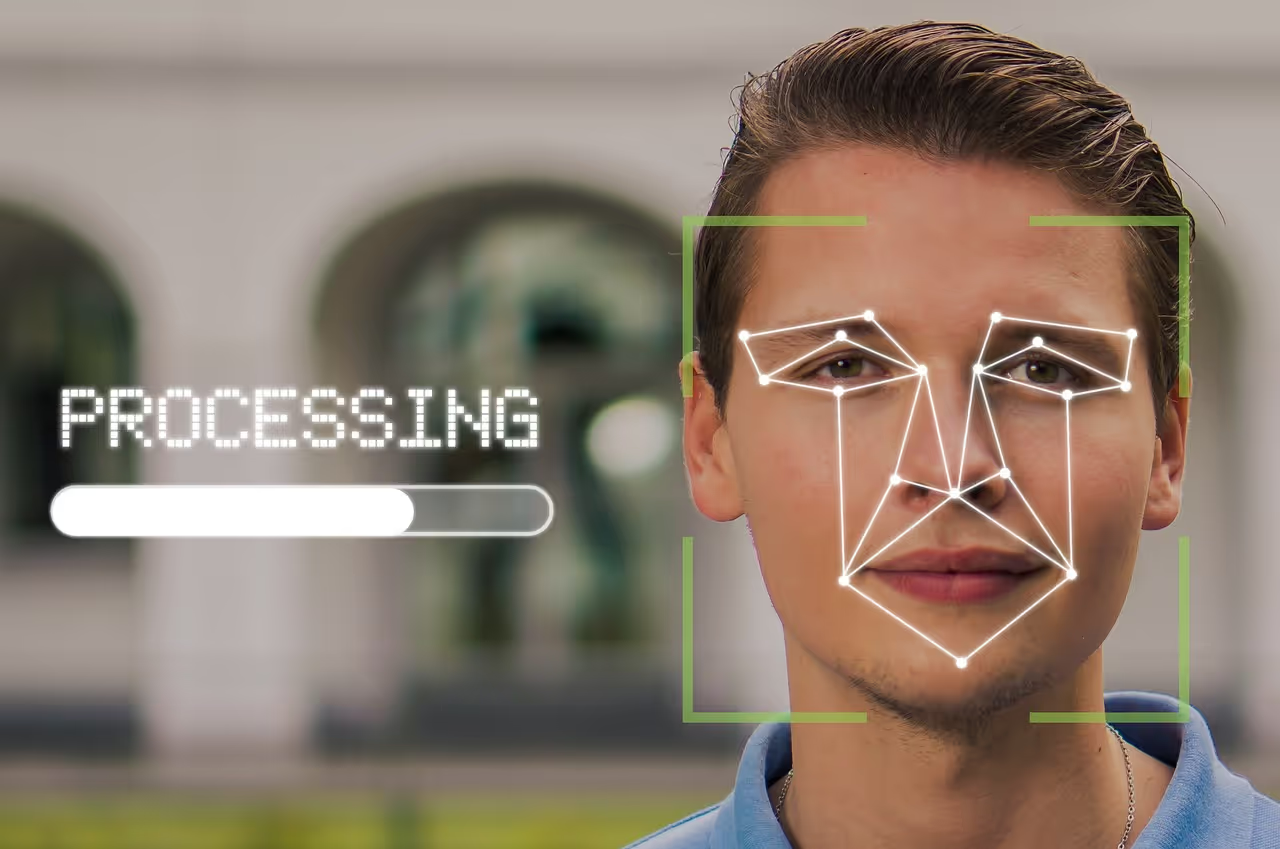
Quick answer: Biometrics is the broad family of identity checks based on a person's unique body traits, such as fingerprint, face, iris, palm vein, and voice. Facial recognition is one type of biometrics: it maps the geometry of a face (the distance between the eyes, nose shape, jawline) into a mathematical "faceprint" and matches it to confirm identity. The practical difference that matters at work is recognition vs. authentication: facial recognition can passively scan a crowd (1-to-many), while facial authentication checks one consenting person against their own enrolled template (1-to-1). For workplace access on shared devices, facial authentication is the privacy-safer choice.
Choosing how to verify identity at work usually comes down to a simple question: should you use biometrics broadly, or facial recognition specifically? They are not competing categories. Facial recognition sits inside biometrics, but the two solve access differently. This guide explains what each one is, how the technology actually works, how facial recognition compares with fingerprint and other biometrics, and which approach fits your organization. Contactless, password-free access has moved from a nice-to-have to a baseline expectation, especially for frontline and shared-device teams who can't carry personal phones or hardware tokens.
Recent technological advancements support a cloud-based access control system, enabling any smart device to function as an access control reader. By 2026, the access control market is projected to grow to a $13.1 billion USD industry, with an expected CAGR of 8.7%.
According to Future Market Insights, the "rising adoption of security and access control devices along with the rising trends towards multi-modal or hybrid biometric systems are accelerating the growth of the fingerprint biometrics market." The fingerprint biometrics market is expected to reach US$67.1 billion by 2023.
Passwordless authentication is the most preferred type of identity authentication among consumers, with 63% expressing a preference for passwordless authentication methods. Multi-factor authentication (MFA) stands as the most effective way to prevent unauthorized access to accounts, with MFA reducing the risk of successful account takeover attacks by 99% (Source: Microsoft Security Intelligence Report 2022).
Biometric authentication is the most secure type of identity authentication, with biometric authentication systems achieving accuracy rates of over 99% in many cases (Source: National Institute of Standards and Technology).
What is facial recognition, and is it biometric?
Yes, facial recognition is a form of biometrics. Biometrics is any method that confirms identity from a unique physical or behavioral trait. Facial recognition is the biometric that uses the face: a camera captures your image, software measures unique landmarks (often called nodal points: eye spacing, eye-socket depth, nose width, jawline shape), and those measurements become a single encrypted number called a faceprint or template. The system never has to store a photo of you; it stores the math. To prove identity, it compares a fresh faceprint with the one on file.
A faceprint is treated as sensitive personal data, so where it is stored matters as much as how it is captured. Consumer devices like Apple Face ID and Windows Hello keep the template in isolated hardware on the device (Apple's Secure Enclave, Android's Knox). Workplace systems should follow the same principle: keep the template encrypted, store the math rather than the image, and never share raw face data across systems.
How does facial recognition work?
Modern facial biometrics follows the same four-step pipeline, whether it's a phone or an enterprise access reader:
- Capture: a 2D or 3D camera (or an infrared depth sensor) records an image or short video of the face.
- Detect: the software locates the face in the frame and isolates it, even in motion or poor light.
- Extract: AI measures the nodal points and converts the geometry into a unique mathematical faceprint. Nothing recognizable as a photo is kept.
- Match: the faceprint is compared against stored templates. A 1-to-1 match verifies one claimed identity ("Are you who you say you are?"), while a 1-to-many match searches a whole database ("who is this?").
Liveness detection is the safeguard that separates a serious system from a spoofable one. By requiring structural depth, a blink, or a subtle movement, liveness detection blocks attacks that use a printed photo, a screen, a mask, or an AI deepfake. 3D depth mapping (the approach behind Apple Face ID) is mathematically harder to fool than basic 2D face unlock, which is why budget 2D systems can sometimes be tricked by a photograph.
Accuracy is described with two error rates: the false acceptance rate (FAR), which measures how often the wrong person is let in, and the false rejection rate (FRR), which measures how often the right person is wrongly denied. Good systems push both low at once. The U.S. National Institute of Standards and Technology (NIST) has reported biometric accuracy above 99% in many tested systems, though real-world results vary with lighting, camera quality, and the algorithm.
What are the main types of biometric access control?
Biometrics access control combines advanced security with unparalleled convenience. It grants access based on the user's unique biometric traits, eliminating the risk of losing critical access control objects.
- Fingerprint Access: Synonymous with biometrics, fingerprint access control is widely recognized. It is one of the oldest biometrics used for signing and authenticating confidential documents. Modern systems are cost-effective and widely produced, even integrated into smartphones for owner authentication.
- Palm Vein Biometrics: A relatively new technology, palm vein biometrics identifies users based on vein and blood flow patterns in their palms. As an internal biometric, it offers higher security. Reverse engineering palm veins without advanced hacking systems is extremely challenging. It boasts the lowest false rejection and acceptance rates among biometric technologies.
- Iris Biometrics: This system authorizes users based on the unique pattern of their iris. It captures a higher number of data points, making it one of the most accurate biometric systems. To enhance security, both eyes can be scanned.
- Voice Biometrics: Useful in call centers, voice biometrics identifies individuals based on their voice. While helpful, voice can be easily duplicated. For advanced security, a combination of voice recognition and other biometrics is recommended.
- Handwriting: Common in judicial and banking systems, users are authorized based on their signatures. Touchscreen devices can be modified for handwriting recognition, primarily used as a low-level security measure.
Pros of Biometrics
- Unique to the user
- Difficult to duplicate
- Easy permission management
- Accurate access control
- No need to remember access codes
- Always available
- Efficient and quick access
- Reduced need for security personnel
- No replacement cost
Cons of Biometrics
- Susceptible to wear and damage
- Changes in fingerprints due to cuts or bruises can make identification difficult
- Requires physical contact, which can be unhygienic
- Vulnerable to duplication through 3D printing and fingerprint analysis technologies
- Iris scanners can capture images from a distance, raising privacy risks
- Voice-based systems may not address privacy concerns and are less effective in noisy environments
- Inconsistent signatures can make authorization challenging
Facial recognition vs fingerprint vs other biometrics at a glance
The honest verdict: there is no universal winner. Face unlock is the most convenient and hygienic and shines on shared, high-traffic devices; fingerprint is more reliable in the dark and for discreet, in-hand unlocking; iris and palm vein win where security outranks speed. Many organizations run more than one in parallel, known as a multimodal setup, and let the risk level of each door or system decide.
Facial recognition vs facial authentication: what's the difference?
People use these terms interchangeably, but they describe opposite goals:
- Facial recognition is usually a passive, 1-to-many search. A camera scans a crowd or video feed and tries to match unknown faces against a large database. This is the surveillance and law-enforcement use case, and it's where most privacy and consent concerns come from.
- Facial authentication is an active, 1-to-1 check done with your consent. You enroll once, then confirm your own identity to unlock a device, app, or door. It answers a simple yes/no ("is this the enrolled person?") and is far more privacy-centric because it never searches a population.
For workplace access, you almost always want authentication, not recognition. Tools such as OLOID's facial authentication for shared devices are built around 1-to-1 verification with on-device liveness checks, so a frontline worker can log into a shared terminal in a second without a password, and without their face being added to any surveillance database. This is also why facial authentication pairs naturally with phishing-resistant MFA: the face becomes a strong, deviceless factor that can't be stolen the way a password or one-time code can.
How is facial recognition used for access control?
Facial recognition is another widely used biometric access system. It authorizes individuals based on facial vectors and features. For instance, iPhones use Face ID for heightened smartphone security, surpassing fingerprint-based authentication. The banking sector has also adopted facial recognition for Electronic Know Your Customer (e-KYC) and employee attendance. These systems can be adapted to verify health measures, such as using face masks or body temperature scanning. Smart advertising systems additionally employ facial recognition for targeted advertising.
Pros of Facial Recognition
- Requires minimal interaction
- Completely contactless
Cons of Facial Recognition
- Facial expressions may lead to recognition errors
- Facial accessories may result in authentication failure
- Facial features can be captured from far away, making the system vulnerable to security risks
- Privacy concerns include recognition without consent
The right system depends on your risk level and your environment. For the most sensitive areas, such as heavy machinery, confidential records, financial vaults, and proprietary research, layer high-assurance biometrics like palm-vein or iris with a second factor. For everyday workplace access, facial authentication is usually the best balance of speed, hygiene, and security: it's contactless, hard to share, and works on the shared devices frontline teams already use. Most organizations run more than one method in parallel, matching the assurance level to each door and system.
This is exactly the gap OLOID is built for. OLOID replaces passwords with facial authentication (plus badge, NFC, and QR as fallbacks) for frontline and shared-device workers, with continuous authentication and presence detection that locks a terminal the moment the verified user steps away, and an auditable shared-account login that ties every access on a shared device back to a real person. It's used in healthcare and manufacturing, where speed, hygiene, and compliance all matter at once.
Which Access Control is Best for Your Organization?
Biometrics-based systems are useful for authenticating users for restricted access. Employees can be assigned different levels of access to the same center based on their permissions, eliminating the need for key cards, strip cards, or passwords to enable restricted access.
ePassports are now widely used to prevent counterfeit and duplicate documents. Biometric technology has simplified attendance and company payroll systems. Similarly, financial institutions incorporate biometrics involving bodily features to ensure customer authenticity.
Facial recognition systems are useful when identification is more critical than authentication, as in law enforcement. Accurate facial mapping technologies can identify a person even with makeup.
Facial emotion recognition has significantly enhanced the use of facial recognition systems. It is instrumental in marking attendance during meetings since a single image can identify all the participants. The incorporation of AI technology results in better facial recognition algorithms that can continuously learn. They are used to quickly locate missing people based on CCTV footage.
Various countries and institutions use FR systems for identification, authentication, and authorization for purposes beyond granting access. For example, China plans to employ facial recognition systems for its social credit system. Airports use facial recognition to expedite security procedures. Voter identification in Brazil's electoral systems also relies on facial recognition.
Frequently Asked Questions
1. Is facial recognition a type of biometrics?
Yes. Biometrics covers any identity check based on a unique body trait, and the face is one of those traits. Facial recognition maps facial geometry into a faceprint, so it is firmly a biometric method.
2. What is the difference between face recognition and face verification?
Recognition usually means a 1-to-many search, matching an unknown face against many records. Verification (also called authentication) is a 1-to-1 check that confirms one claimed identity. Most phone unlocks and workplace logins are verification.
3. Is facial recognition the same as facial authentication?
No. Facial recognition can passively scan crowds (surveillance). Facial authentication is a consent-based 1-to-1 check you opt into, such as unlocking a device. Authentication is the privacy-safer choice for work.
4. Which is more secure, face recognition or fingerprint?
Neither is universally better. 3D face systems with liveness detection are very hard to spoof; fingerprint is extremely accurate and reliable in any light. The right pick depends on lighting, hygiene needs, and whether hands are free.
5. Is face recognition better than fingerprint for phones?
Face unlock is faster and hands-free, but it can struggle in the dark or with masks and sunglasses. Fingerprint works in any light and is great when the phone is flat on a desk, but fails with wet or dirty fingers. Many people enable both.
6. Can both methods be used together?
Yes, this is called multimodal biometrics. Using two traits (for example, face plus fingerprint, or face plus a badge) raises security and reduces false rejections.


.webp)

Get the latest updates! Subscribe now!

