Authentication that keeps up with clinical workflows
Replace slow, workstation-dependent access with instant, passwordless authentication across shared clinical devices, tied to the clinician, not the device.
- Face, badge, or mobile: choose by clinical context
- Direct authentication (no overlay apps or middleware)
- Epic-validated (Hyperdrive, Slingshot, Toolbox)
- Works with Okta, Entra ID, Ping Identity, Duo

Simple. Fast. Secure
Works with your IdP, your badges, your EHR. Nothing to replace.

Enroll Identity
Face, badge, or mobile credentials linked to a verified clinician identity. One enrollment covers every device and location

Authenticate Instantly
Tap or glance at any shared workstation. Verified via cloud, on-device, or offline; every session tied to the clinician, not the device

Access Clinical Systems
Single sign-on into EHR and enterprise apps. Windows unlocks, apps launch by role, patient context preserved across devices
See Tap-to-Login in action
Built for modern clinical environments
Legacy Clinical Authentication |  |
Login tied to a specific workstation and badge reader | Identity-based access across any shared device |
Badge-only (one modality regardless of setting) | Face, badge, or mobile, matched to clinical context |
Full logout-login cycle to switch users | Instant switching: apps stay open, context preserved |
Middleware or overlay layer between clinician and EHR | Direct authentication into Windows, Epic, and apps |
On-prem servers and hardware at every site | Cloud-delivered: deploys without on-prem infrastructure |
Requires an on-site appliance; goes down when the network does | Cloud-delivered with offline capability: always available |
Measurable outcomes for clinical teams
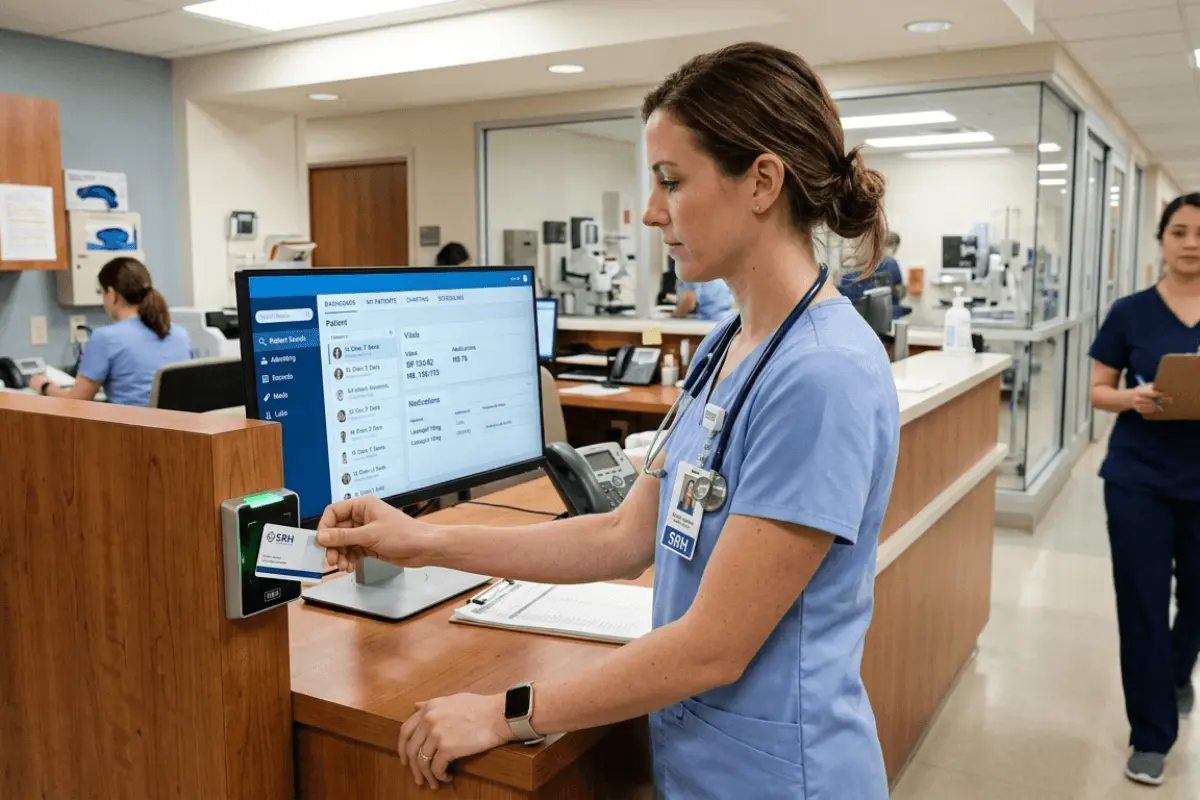
- Login times drop from 15+ seconds to under 3 seconds
- Shared credentials eliminated across clinical environments
- Faster clinician productivity during shift transitions
- Identity-linked audit trail for every session, every device
No rip and replace:
OLOID enhances what you already use
Native integration with the identity, EHR, VDI, and device management tools clinical IT teams already run.
IAM & SSO





EHR & Clinical Systems



VDI & Endpoints





MDM


Questions clinical IT teams ask before switching
How is OLOID different from legacy clinical authentication platforms?

Most clinical auth was built for local hospital deployments tied to a single proprietary SSO layer. OLOID is cloud, hybrid, and offline capable, works natively with your existing SSO (Okta, Ping, Entra ID, Duo), and is validated by Epic on Hyperdrive, Slingshot, and Toolbox, so IT teams spend less time on infrastructure and more time on clinicians.
What happens during network outages or connectivity issues?
OLOID supports cloud, hybrid, and full offline authentication modes. Clinicians can continue authenticating on device during outages, with secure sync and centralized audit on recovery. No insecure workarounds, no shared passwords during downtime.
Does OLOID work with our existing SSO and identity provider?
Yes. Native integrations with Microsoft Entra ID, Okta, Ping Identity, Azure, and Cisco Duo. Plus EHR integration (Epic, MEDITECH, Oracle Health, Allscripts, Athenahealth), VDI (Citrix, Omnissa, IGEL, HP ThinPro, Dell Wyse), and MDM (Intune, Workspace ONE, SOTI, Jamf Pro). No proprietary SSO layer, no duplicate directory.
Is OLOID Epic certified, HIPAA-compliant, and EPCS-ready?
Yes. OLOID is Epic Showroom and Epic Toolbox certified, with validated integration on Hyperdrive, Slingshot, and Toolbox. HIPAA-aligned and EPCS-ready for controlled substance prescribing workflows. Full compliance documentation available on request.
Can clinicians keep the badges they already use?
In most cases, yes. OLOID is hardware agnostic and works alongside existing NFC/RFID readers, plus Apple Wallet and Google Wallet mobile credentials, facial, and PIN, so you're not reissuing badges to your workforce to switch.
See what clinical login in under 3 seconds looks like.
Book a 15-minute walkthrough. We'll show you how OLOID works with your EHR, your SSO, and your shared devices.
